How to Evaluate AI Marketing Tools Without Creating More Sprawl

Founder, Grow Predictably · 15+ yrs building B2B revenue systems

TL;DR: Evaluating AI marketing tools starts with diagnosis, not shopping. According to SurveyMonkey, 88% of marketers already use AI in day-to-day roles, so the adoption problem is solved. The evaluation problem is not. The real filter is whether each tool has a defined job inside your marketing operating system, or whether it’s adding to your AI sprawl.
Key Takeaways
- Define the job before you add the tool. If a tool can’t answer “what bottleneck in content creation or audience research does this fix,” it doesn’t belong in your stack.
- AI sprawl is a system problem. Six new subscriptions won’t fix a missing operating thesis.
- Category fit beats feature count. I’d rather run one opinionated tool per category (writing, NeuronWriter for on-page optimization, research) than three overlapping ones.
- Kill criteria matter as much as adoption criteria. If you can’t name the conditions under which a tool gets cut, it’s already drift.
- A 60 to 90 day sequence beats a 12-tool launch. Pick one constraint, install one tool, wire it into your content pipelines, then earn the next one.
Every marketing team I audit can rattle off its AI tools faster than it can name what each one is actually for. Six writing assistants, three research tools, an analytics dashboard nobody opens, and a subscription bill that climbs every quarter while the work barely moves.
If that is your stack, the answer isn’t another buying spree or a longer feature-comparison spreadsheet. It’s a hard filter run against every tool you already pay for: which documented workflow does this own, and which constraint does it move? Everything here builds from that one question, because a tool that can’t answer it is sprawl wearing a demo.
This article walks you through that evaluation filter, using your AI marketing strategy and its marketing operating system as the backbone, so you add and keep only the AI marketing tools that create leverage instead of more AI sameness.
What’s the actual job of an AI marketing tool, and why does the typical tool list miss it?
An AI marketing tool’s job is to remove one named constraint inside your operating system.
Most tool lists miss this because they rank vendors by capability count instead of the workflow each tool is hired to compress, so readers end up with subscriptions nobody can connect to a result.
What ‘job to be done’ means for an AI tool
The framing comes straight from Harvard Business School professor Clayton Christensen, who originated jobs-to-be-done. As Christensen put it in his 2005 Harvard Business Review paper on marketing malpractice:
When people find themselves needing to get a job done, they essentially hire products to do that job for them. — Clayton Christensen, Harvard Business School
An AI tool is no different. You hire it for a job, or you do not hire it at all.
A tool earns its slot when it eliminates a documented constraint or shrinks the gap between a marketing decision and its output. If I can’t point to the workflow it’s replacing or the hour it’s giving back, the tool isn’t doing a job. It’s a login with a monthly bill.
I’ve watched teams stack Copy.ai, Hypotenuse AI, and a couple of generic AI agents on top of an undiagnosed funnel, and the result is always the same. Your output goes up. Your constraint doesn’t move. That’s activity buildup, not acceleration.
Why feature-list evaluations create sprawl
According to HubSpot’s AI Trends for Marketers report, 79% of marketers say AI and automation help them spend less time on manual tasks. But that time only shows up as value if you defined what the tool was replacing before you signed. And the tools rarely deliver on their own: Gartner found marketers use just 42% of their martech stack’s capabilities, down from 58% in 2020. Buying more is not the constraint. Using what you already have is.
Across the teams I’ve worked with, the evaluation usually skips the hard part and jumps straight to the subscription.
In practice, that looks like this:
- Start with a polished vendor demo
- Skip any real constraint audit
- End with a subscription nobody can tie to a specific result
It’s why IBM AI marketing case studies and AI-powered creativity decks rarely translate into operator results inside a smaller marketing strategy.
The three-part litmus test
A good AI tool has to do three things at once:
- Deliver immediate value regardless of who’s driving it
- Show enough of its working that I can tweak the output
- Open a deep layer of control for the daily operator
“I don’t like black box things,” is the rule I run my stack against. Fail any of those and the tool doesn’t earn a slot inside a credible marketing operating system.
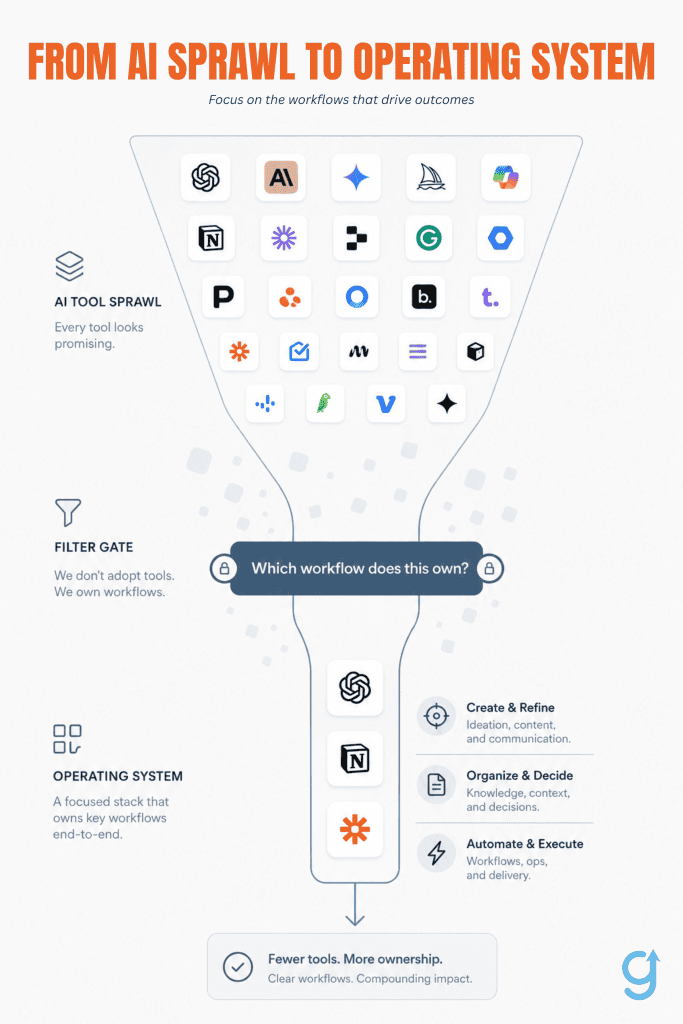
Why does adding AI marketing tools without an operating system always end in AI sprawl?
AI sprawl happens when you add tools to non-constraints instead of to documented workflows. Without a marketing operating system that governs your AI stack naming which workflow each tool owns, every new subscription becomes a pilot that never graduates to production. The team’s AI bill grows linearly while the output curve flattens.
What AI sprawl actually looks like
The pattern I see most often: a team can name their SEO tools, content generators, and chat assistants faster than they can name the workflow each one owns. If your team can list its tools faster than its workflows, you’re already in sprawl.
In practice, it looks like this:
- Six subscriptions, no documented thesis.
- Two people who can log into all of them.
- A monthly invoice nobody reviews against an operating rhythm because no operating rhythm has been written down.
Why the evaluation loop never ends without an operating system
According to Statista, most marketers are integrating AI in selected areas or still exploring before full implementation, and only a small fraction have no plans at all. That large middle is where sprawl lives.
You evaluate Google Gemini this quarter, swap to a different writer next quarter, add a performance analysis dashboard the quarter after that, and the data insights you collect about each pilot never compound because nothing was ever production. The loop runs forever because the operating system that would close it doesn’t exist yet.
The constraint-first test for new tools
I borrow this from manufacturing: adding capacity to a non-constraint slows the system. Before I add anything, I ask one question: Which documented workflow does this tool own, and which constraint in that workflow does it move?
If I can’t answer both in a sentence, the tool doesn’t get a slot. That’s the filter that keeps your stack opinionated and your Tools & Tactics layer subordinate to the operating system above it.
How do you decide which AI marketing tools belong in an opinionated stack?
An opinionated stack starts with a documented constraint, not a shiny tool.
You’re already doing the right sequence:
- Name the constraint: what workflow is stuck, and what would it look like unstuck?
- Assign a tool category: research, orchestration, writing, analytics, QA, etc.
- Only then pick a specific tool to fill that category.
This turns your stack into a system, not a shopping list, and reduces AI sprawl because a tool cannot exist without a problem and a defined job.
The constraint-first evaluation sequence
My Tools & Tactics framework starts with the bottleneck, not the vendor. Before I look at any AI tool, I want a one-sentence answer to: what workflow is stuck, and what would it look like unstuck?
If my team can’t write that sentence, the tool doesn’t earn a slot. This applies whether the workflow is market research, campaign automation, or strategy refinement.
So when you’re deciding what belongs in your stack, ask yourself:
- What specific workflow is actually stuck right now?
- What would “unstuck” look like in concrete terms (outputs, speed, quality)?
- Does this workflow genuinely need a dedicated tool, or is it a process problem?
If you can’t answer those clearly, you’re not ready to add a tool yet. And that’s a good thing to know.
Applying the three-part litmus test in practice
From there, I use three non-negotiable gates. I don’t like black box things. I put something in, and something magic happens, and something comes out. I need to be able to see a little enough of what’s in there. That’s the rule.
For any AI tool to earn its place, it has to:
- Deliver immediate value at any skill level
- Give enough transparency so you can see and tweak what’s happening
- Expose a deeper layer of control for power users
Miss one gate, miss the slot. I don’t care how popular the tool is. The full mapping by workflow lives in the AI Collaboration Matrix, where I match specific workflows to tools that actually pass this test.
Setting a 30-day output standard
I also give every new tool a 30-day window to prove itself. In that window, it has to produce a concrete, repeatable output that my team actually cares about. If we can’t point to a real workflow artifact the tool generated, the slot stays open.
That means I’m looking for things like:
- A reusable brief, template, or playbook
- A repeatable report, sequence, or campaign asset
- A clear reduction in time for a specific recurring task
Tools like Blaze get the same trial as anything else. No tool gets a permanent home just because we installed it or liked the demo.
Kill criteria: when to remove a tool
I also borrow from a presentation habit I keep: every tool evaluation needs a “what this tool does NOT do” line. That keeps it in its lane and stops it from quietly sprawling into other jobs it’s not built to own.
For removals, my rule is simple: the day a tool no longer owns a documented workflow, it goes on the next billing cycle. No exceptions. If it doesn’t have a clear job, clear outputs, and clear boundaries, it doesn’t belong in an opinionated stack, no matter how hard I worked to onboard it.
What are the AI marketing tool categories worth keeping in your operating system?
In my stack, only a handful of AI categories earn a permanent slot. I’m ruthless about it: I’d rather have one clearly owned tool per job than a graveyard of “cool” installs nobody uses.
Five categories consistently pull their weight in a B2B marketing operating system: content production and optimization, audience and market intelligence, workflow automation and orchestration, analytics and attribution, and conversation and qualification.
I pick one tool per category, name the owner, and kill the rest. Category fit closes a real constraint. Tool sprawl never does.
The five keeper categories and what job each one owns
Working across marketing teams taught me that the category list always shows up before the tool list. When I get that backwards, things break.
Here’s how I think about the five categories and the jobs they own:
- Content production and optimization absorb first-draft hours once you’ve documented the operator framing and brand rules.
- Audience and market intelligence turns vague “we should know our ICP better” into concrete, answerable questions tied to campaigns and offers.
- Workflow automation and orchestration cover handoffs your team is already doing in Slack, email, and spreadsheets, but with fewer dropped balls.
- Analytics and attribution surfaces which content, channels, and plays actually close deals instead of just driving vanity metrics.
- Conversation and qualification filters inbound interest so humans spend their time where intent and fit are actually high.
I always pick the category that closes my biggest constraint first, then move down the list. If pipeline quality is the real constraint, conversation tools get the slot before fancier analytics. If execution speed is the issue, content or workflow wins.
Market intelligence is the category most B2B teams under-invest in
Market intelligence is the category I see most B2B teams under-invest in, and often the one I push hardest.
When I look at typical stacks, this is where I see the biggest gap on your side of the fence, too. Tools in this category, like GWI Spark, are built to draw on large ongoing survey panels and let you ask natural-language questions and get structured, sourced answers back instead of digging through static reports. That’s the shift I want to fund: moving from passively reading reports to actively asking constraint-specific questions and getting decision-ready answers.
That’s exactly the pattern I call out in the AI Collaboration Matrix: AI doesn’t just summarize. It becomes the front door to structured, defensible audience insight. When that’s true, it earns its category slot.
What to watch: emerging categories not yet ready for production stacks
There are also emerging categories I keep on my radar, but don’t rush into my production stack. Digital twin and simulated-response tools are one of them.
Think of tools that use public or proprietary data to simulate how a segment might respond to a message or concept. The promise is clear: the cycle from hypothesis to “we have a signal” gets much shorter.
But here’s my line: the validation discipline still has to be yours. Until I’m confident that a tool’s simulated signals consistently match what I see in real campaigns and sales conversations, it stays in the “experiment and observe” bucket, not the “core operating system” bucket.
How do you kill AI marketing tools without losing the workflow they ran?
You kill AI tools safely by documenting the workflow first, migrating it, and only then cancelling the subscription. That way, the work survives even if the vendor doesn’t.
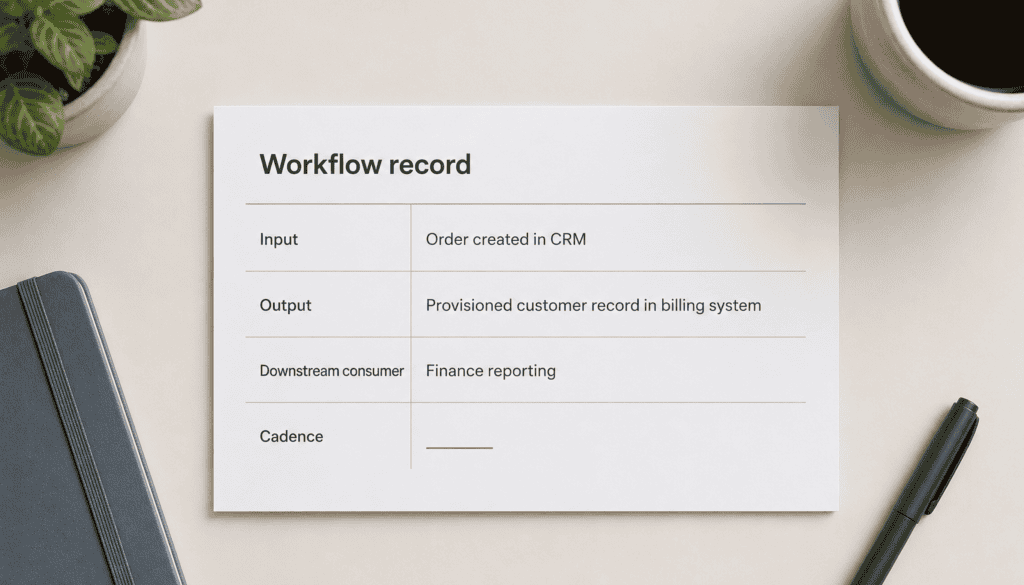
The four-field workflow documentation template
Before I cancel anything, I force myself to write down the workflow the tool truly owns, not the one the sales deck promised. I treat it like a mini operating note: if I disappeared tomorrow, could someone else keep this loop running?
I use four simple fields and won’t move forward until they’re all filled in:
- Input: What goes into the tool? (e.g., a list, form fill, Slack request)
- Output: What concrete artifact comes out? (e.g., a report, brief, enrichment, sequence)
- Downstream consumer: Who actually uses that artifact, by name or role?
- Cadence: How often does this run in real life, daily, weekly, monthly, or ad hoc?
If I can’t name a downstream consumer, I treat that as a signal, not a mystery. The tool was running on autopilot for no one, and the real risk of removal is basically zero.
When I walk teams through this, the “scary” tools usually turn out to be something one person used occasionally, with no artifact anyone else ever looked at. The discipline here mirrors how I scope what a strategy doc doesn’t do: I name the boundary before I move it.
Migration before cancellation: the safe removal sequence
My removal rule is simple: migrate first, cancel second.
If the workflow is real and the four fields are filled in, I make sure it lands somewhere safe before the renewal date:
- Can a tool I’m keeping absorb the same input and output with minor tweaks?
- Can I route it through an automation handoff so the downstream consumer still gets what they need?
- Can I document a lightweight manual step that preserves the artifact with less complexity?
Most of what looks like “automation” in a bloated stack is actually personalized messaging, enrichment, or real-time analytics that another tool in your marketing operating system can absorb with a bit of reframing.
You’ll know the migration worked when the downstream consumer doesn’t notice the swap. No one pings you asking, “Hey, where did that report go?”
Only once the new path is in place, and I’ve seen at least one run complete, do I cancel the old tool. Cancel last, not first. That sequence is what protects the work from the cleanup.
The 90-day audit cadence
I don’t wait for annual renewals to do this. Annual audits are too slow for how fast AI stacks swell.
I run a 90-day cycle and treat it like any other optimization loop: test, analyze, improve, and release what no longer clears the bar.
Every 90 days, I ask of each tool:
- Does it still have a clearly documented workflow (input, output, consumer, cadence)?
- Did it produce real artifacts in the last 90 days that someone downstream actually used?
- Is the constraint it was hired to solve still a constraint, or has it been resolved or moved?
If the bottleneck the tool was hired for is gone, I don’t invent a new job just to justify its existence. I release it. A tool that earns its place every 90 days is a tool the stack actually needs.
What does an AI marketing tool stack look like for a 60-90 day visible win?
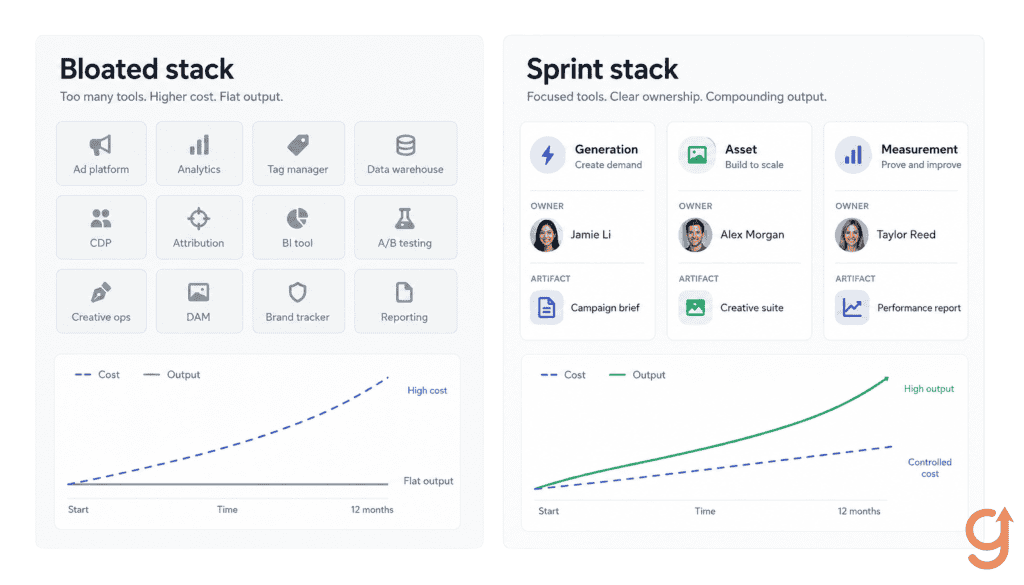
An AI marketing tool stack built for a 60-90 day visible win is intentionally small, tightly owned, and judged on specific artifacts, not activity. You’re designing a sprint stack, not a forever stack.
Choosing the right three categories for the window
Every team I’ve watched try to activate more than three tool categories in a single quarter ends with partial adoption across all of them and full integration in none. So I force the constraint: pick three.
For a visible 90-day win, my short list usually looks like this:
- One generation category This is where something like ChatGPT or Frase runs first-draft content against a documented operator prompt, style rules, and examples. The job isn’t “write everything for us.” The job is “absorb first-draft hours so humans can focus on strategy, editing, and QA.”
- One asset category This is often digital asset management, where the visible artifact is a tagged, searchable, queryable library instead of a shared drive full of orphan files and V12_final_FINAL.docx. The point is that people can actually find and reuse what you’ve already created.
- One measurement or routing category If the workflow demands it, this might be cross-channel reporting (for example, an analytics layer that rolls up content performance across channels) or routing/ops (lead routing, alerts, or basic orchestration). The job is to show the impact of the first two categories or to keep the new volume from breaking your existing processes.
Your stack will look thinner than your competitor’s screenshot, and that’s the point. Thin stacks with clear jobs ship real work in 90 days. Bloated stacks ship screenshots.
Defining the visible win artifact before day one
If your team can’t name what winning looks like at day 90 in output terms, the window will produce activity but not proof. My rule is simple: without a defined “aha,” there’s no real first win.
Before you sign contracts, I like to write a one-sentence “artifact promise” for each category, for example:
- Generation: “By day 90, we will have published X pieces of net-new or upgraded content created with AI-assisted first drafts, at a documented throughput lift of Y% versus last quarter.”
- Asset: “By day 90, we will have a tagged, searchable content library where at least Z key personas or use cases can be fulfilled in under N clicks.”
- Measurement/routing: “By day 90, we will have a single view (or slide) that shows which campaigns and assets are generating pipeline or savings, and what budget we can reallocate.”
If I can’t write that sentence, the tool doesn’t go into the 90-day window. No artifact, no window.
What a 90-day integration sequence looks like
In practice, a 60-90 day visible-win stack looks almost boring on paper:
- Three categories, three owners, three artifacts.
- Weekly check-ins on the artifacts, not on “tool usage.”
- A clear “we shipped this” moment by day 90 that you can show to a skeptical exec or board.
The tools are there to ship those artifacts on time. Everything else, the features, roadmaps, even the AI buzz, is secondary.
What’s the ROI signal for an AI marketing tool that earned its place in the stack?
An AI marketing tool earns its place in the stack when it ships a repeatable artifact that another workflow genuinely relies on. The clearest ROI signal is dependency, not excitement.
Output artifact dependency: the baseline ROI test
Here’s the test I ran with operators, and you can run it on your own stack:
- Name the tool.
- Name the artifact that ships each week or month.
- Name the downstream workflow that breaks if that artifact stops shipping.
If any of those answers are fuzzy, the tool hasn’t truly earned its slot in your marketing operating system. A Surfer brief nobody opens is overhead. A Surfer brief every writer opens before drafting is load-bearing, and your content team will feel the loss within a week.
The moment your team says, “We can’t do X without that artifact,” you have a real ROI signal.
Time saved vs. constraint moved: why the distinction matters
According to HubSpot’s AI Trends for Marketers report, 73% of marketers say AI lets them spend more time on the most important parts of their role. That sounds like ROI. It usually isn’t.
I’m careful not to confuse “time saved” with “constraint moved.” Time saved is only ROI when it’s redeployed into a higher-value constraint.
I treat it like this:
- If Grammarly saves a writer 20 minutes on proofreading, that’s useful, but only economically meaningful if those 20 minutes now go into a higher-constraint activity (like better briefs, deeper research, or more outreach).
- If that time just evaporates into slack or mild comfort, the tool improved the experience, not the business.
So when someone says, “This tool saves us a bunch of time,” I always follow with, “Great. What are you now doing with that time that you weren’t doing before?” If there’s no clear answer, I don’t count it as ROI.
The one-indicator rule per tool category
This is where my Growth Scorecard lens comes in. For every tool category in the stack, I insist on one main leading indicator and review it on a 90-day cadence.
Examples of what that looks like:
- Content tools: track artifacts shipped against a clear quality rubric and business outcome (e.g., briefs used, pages published that meet a certain traffic or lead threshold).
- Measurement tools: track decisions changed, not dashboards built (e.g., budget reallocated, campaigns paused or doubled down on because of data).
- Conversation or influencer tools: track booked conversations or qualified opportunities, not impressions or likes.
Vanity metrics like opens, views, sheer content volume, and pretty formatting are noise. When founders chase view counts, I bring it back to the one question that matters: which campaigns are making money, and which are losing money?
The tool either moved its indicator or it didn’t. If it didn’t, it’s a candidate for removal, no matter how much the team “likes” it.
How do I know a tool has truly earned its place?
So, in practice, a tool has earned its place in my stack when:
- It produces a named artifact on a regular cadence.
- A downstream workflow breaks or materially degrades if that artifact stops.
- The time it “saves” has been visibly redirected into a higher-constraint activity.
- Its one core indicator is moving in the right direction over a 90-day window.
If I pull the tool tomorrow and nothing important stalls, it never really earned the slot.
How do you stop adding AI marketing tools and start building an opinionated stack?
The move I’d make this week isn’t a new subscription. It’s a one-page audit of every AI tool your team already pays for, scored against the workflow trichotomy filter (AI-led, AI-assisted, human-only).
The tools that don’t map cleanly to a documented workflow are the sprawl you’re trying to fix, and that audit is the entry point to running the rest of the constraint-first sequence inside an opinionated stack.
Not sure which stage of your funnel the tools should serve? Start with a free Growth Assessment, which names the one stage capping your growth so each tool you keep is wired to the constraint that actually moves the number.
Want to go deeper? Read AI Marketing Strategy: Building Your Marketing Operating System or AI vs. Marketing Automation.
Frequently Asked Questions About AI Marketing Tools
How much should a B2B marketing team actually budget for AI tools annually?
Most B2B teams I see are sitting at $30K-$80K annually on AI subscriptions, which is exactly the line item we’re calling sprawl. There’s no fixed budget answer because the right number depends on how many documented workflows your operating system actually owns. A team running three named workflows with one tool each will spend far less than a team running twelve subscriptions across eight overlapping vendors. Budget the workflows first, then price the tools that close them. Anything else is a procurement exercise dressed up as a strategy.
What’s the difference between AI marketing tools and marketing automation tools?
Marketing automation tools execute predefined rules — send this email when this trigger fires, route this lead when this score hits a threshold. AI marketing tools generate, evaluate, or decide inside a workflow — drafting copy, scoring intent, summarizing research, qualifying inbound. The two layers stack. Automation owns deterministic handoffs, AI owns probabilistic judgment. Most sprawl happens when teams buy AI tools for jobs an automation tool already does cheaper, or buy automation tools for jobs that need AI’s judgment layer. Map the job to the layer before you sign anything.
How big does my marketing team need to be before AI tools are worth it?
Team size isn’t the threshold — documented workflows are. A two-person team with three named workflows can run an opinionated AI stack of three tools and get leverage. A twenty-person team without documented workflows will get sprawl from the same three tools. The question to answer first is whether you can write the four-field workflow record — input, output, downstream consumer, cadence — for the bottleneck the tool is supposed to close. If you can, team size is irrelevant. If you can’t, no headcount fixes that.
How do I get my team to actually adopt a new AI tool instead of letting it die in a tab?
Tool adoption fails because nobody owns the workflow the tool is supposed to run. Assign one operator as the named owner of the workflow before the contract starts. Give them the 30-day window to produce a concrete output artifact. If nothing ships in 30 days, the slot stays open and the subscription gets cancelled on the next billing cycle. The adoption problem is almost always an ownership problem disguised as a training problem. Name the owner, define the artifact, hold the deadline.
What signals tell me a tool category is becoming commoditized and I should switch vendors?
Three signals: pricing converges across vendors in the category, the differentiating feature you bought the tool for shows up in two competitors’ release notes within a quarter, and your operator stops noticing which vendor is doing the work. When all three hit, the switching cost is mostly migration, not capability. Don’t churn for sport — run the four-field workflow doc, confirm the downstream consumer won’t notice, then move on the next renewal. The category still owns a slot in the stack. The specific vendor just stopped earning it.
About the author
Brian helps B2B founders install marketing + automation engines powered by Co-Thinking with AI. With 15+ years building predictable revenue systems, he's worked with SaaS, agency, and service businesses on 90-day done-with-you growth accelerators.
Ready to see your real growth gap?
Two minutes in the Growth Gap Scan and you walk away knowing the one thing capping your pipeline. Free, no obligation.