Why Automate B2B SaaS Processes (Sequence First)

Founder, Grow Predictably · 15+ yrs building B2B revenue systems

TL;DR: Automating a B2B SaaS process is the right move, but only as the last step, never the first. You diagnose the one constraint capping growth, install the fix and prove it by hand, then wrap AI and no-code around the working process so it runs itself. Automating a broken process just makes you fail faster.
Key Takeaways:
- A process is ready to automate only when it’s defined, owned by one person, and already producing the right outcome by hand. Before that, automation locks in the wrong steps.
- Gartner predicts over 40% of agentic AI projects will be canceled by the end of 2027, driven by escalating costs, unclear business value, or inadequate risk controls.
- The constraint that caps B2B SaaS growth usually hides right after the sale. Acquiring a new customer costs five to 25 times more than retaining one, and a 5% lift in retention raises profits 25% to 95% (Bain and Company).
- The Diagnose, Install, Automate sequence runs in that exact order. McKinsey found about half the activities people are paid to do are automatable, so you automate activities inside a fixed process, not the whole job.
- No-code runs the defined rules and moves data. AI handles judgment-shaped steps like drafting and classifying. Together they let a defined process run without a babysitter.
I’ve watched the same pattern play out in B2B SaaS teams for years. Someone gets fed up with a manual task, bolts a Zapier zap or a workflow onto it, and calls it progress. Three months later the growth number hasn’t moved and half those automations have quietly gone dark.
The thing nobody diagnosed first was the constraint, the single tightest bottleneck in the system, and that bottleneck almost always hides downstream, right after the sale. This piece walks the Diagnose, Install, Automate sequence so you can tell which process is actually worth automating and which one is just the loudest annoyance.
If you’re a B2B SaaS founder or marketing leader building the internal case for automating manual work, and you’ve already seen tools get bolted on and drift into shelfware, this is for you. You don’t have a tooling problem yet. You have a sequencing problem.
What follows is what diagnose-first looks like at the automation layer: not another benefits list with tool name-drops, but the order an operator actually runs so the engine ends up running itself.
Why does automating a B2B SaaS process backfire so often?
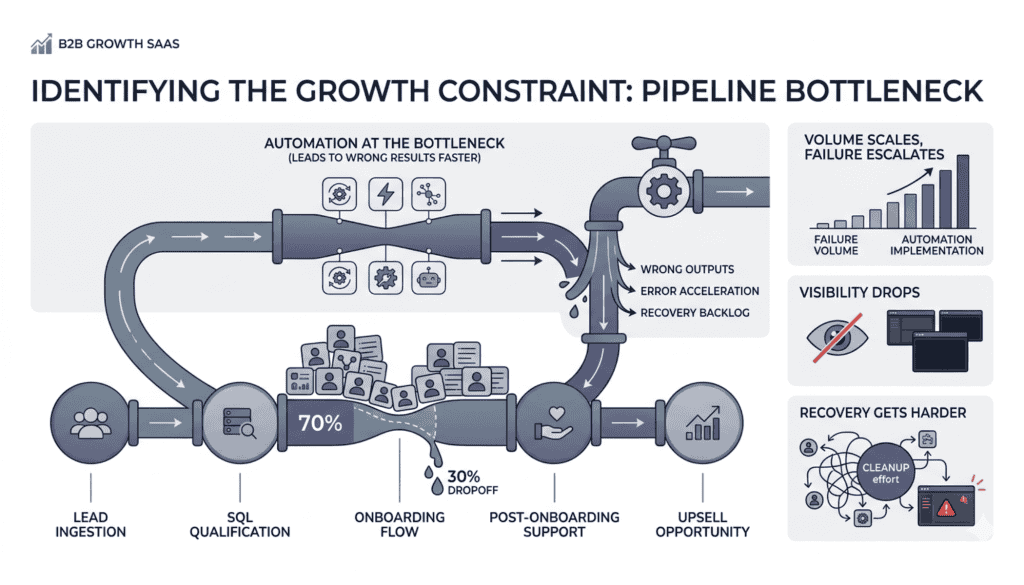
Automation backfires because most teams automate whatever annoys them, not the one process sitting on the growth constraint. Automation strips friction out of a process. When the process underneath is broken, you don’t get fewer errors. You get wrong results faster, at a much larger volume than any person doing it by hand ever could.
Random acts of automation
I call it random acts of automation. A Zap here for lead routing, a workflow there for reporting, an AI agent drafting onboarding emails. Each one feels like a win because it removes a chore. None of them was chosen because it sits on the thing actually capping growth. Motion goes up. Progress stays flat.
The pattern shows up in the numbers. Gartner predicts that over 40% of agentic AI projects will be canceled by the end of 2027, driven by escalating costs, unclear business value, or inadequate risk controls. Not a productivity dip. Canceled.
Anushree Verma, Senior Director Analyst at Gartner, put it plainly: most of these projects are early-stage experiments driven by hype and often misapplied. Misapplied is the operative word. The tool wasn’t the problem. The choice of where to point it was.
Faster wrong answers
Here’s the mechanism in plain terms. If your onboarding process loses 30% of new accounts in week one, automating it doesn’t fix the leak. It means you now lose those accounts on autopilot faster, with no human in the loop to catch the drop. You’ve taken a leaky bucket and bought it a bigger faucet.
Three things happen when you automate ahead of the constraint:
- Volume scales, but so does the failure. The broken step now processes more inputs, which means more outputs going the wrong direction.
- Visibility drops. A person doing it manually would notice something was off. Automation removes that checkpoint entirely.
- Recovery gets harder. By the time the metric appears on a dashboard, the damage is already spread across dozens or hundreds of accounts.
Unlock the constraint first, or you’re just stacking inventory in front of a bottleneck. That’s the thesis of this whole piece: automating a broken process makes you fail faster.
What has to be true before you automate anything?
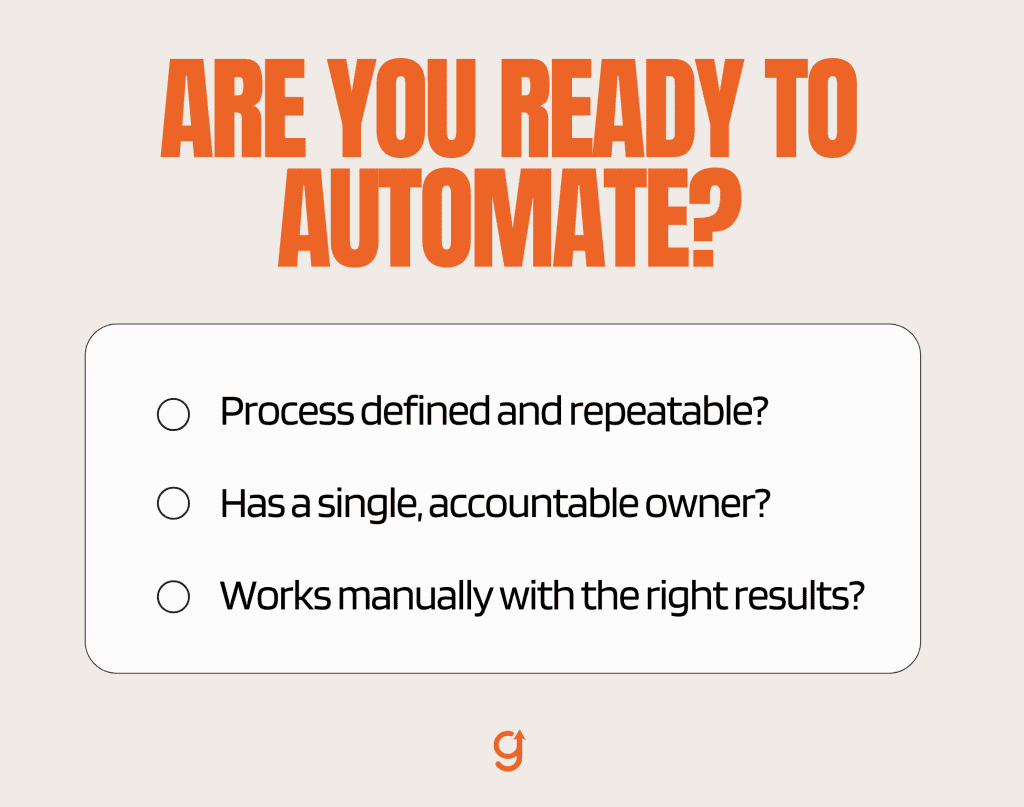
A process is ready to automate when three things are true. It’s defined the same way every time, it has one clear owner, and it already produces the right outcome when a human runs it by hand. Miss any one of those and automation just hardens the wrong steps into your stack.
Defined, owned, and working by hand
Most of the SERP treats “audit your workflows” as a checklist item you do before the real work of picking a tool. I’m telling you the audit is the work. Everything else is downstream of it.
Run this readiness test on any process before you automate it. Three lines, paste it into a doc:
- Is this process defined? Could a new hire follow the steps and get the same result every time, or does it live in one person’s head?
- Does it have one owner? Not a committee. One name accountable for the outcome.
- Does it already produce the right outcome by hand? If a person runs it manually today, do you get the result you want?
If you answer no to any of the three, you’re not ready.
Automating an undefined process locks in steps nobody agreed on. Automating an unowned process means nobody notices when it drifts. Automating a process that doesn’t work by hand just scales the failure.
Training the team on a new tool changes what they know. It doesn’t change what the process produces. Get the process right by hand first.
What should a B2B SaaS team automate first?
You automate the process sitting on the single constraint that caps growth, not the loudest annoyance. And in most B2B SaaS companies, that constraint isn’t at the top of the funnel where everyone’s looking. It hides downstream, right after the sale, where retention is won or lost.
Find the one constraint
Most teams instinctively automate acquisition first. Lead capture, outreach sequences, demo scheduling. It’s visible, it’s measurable, and it feels like growth. Meanwhile, the actual leak is post-sale:
- New customers sign, onboard badly, and never reach value.
- They churn before they renew, often without telling you why.
- More automated leads at the top don’t fix any of that.
If the bucket leaks after the sale, you’re not growing. You don’t have a growth problem. You have a retention problem stifling growth.
The math on this is stark. Acquiring a new customer costs five to 25 times more than retaining an existing one, and Frederick Reichheld of Bain and Company found that increasing retention by just 5% lifts profits by 25% to 95%. So the highest-value process to fix, then automate, is usually the one closest to retention, not the one closest to the new logo.
The leak usually hides after the sale
To find the actual constraint instead of guessing, look at where customers stall in your value journey. That’s a diagnostic question before it’s an automation question.
Three places to look first:
- Activation drop-off. Are new accounts hitting the milestone that signals they’ll stay? If not, where exactly do they stop?
- Time-to-value lag. How long does it take a new customer to get their first meaningful result? The longer that window, the higher the churn risk.
- Support volume by cohort. Are certain customer segments generating disproportionate tickets in the first 30 to 60 days? That’s usually a sign the onboarding process is failing them.
If you want the full case for why chasing tactics, including random automation, stalls growth, why most B2B SaaS growth strategies fail, own that argument end to end. This piece just borrows its lens to answer one question: which process do you automate first?
Start with the diagnostic before you touch a single tool: find the growth gap that’s actually capping you. Once you’ve confirmed the constraint sits on a post-sale step, the deeper retention work belongs in fix the retention leak first. Diagnose, then decide. Never the reverse.
The Diagnose, Install, Automate sequence (the right order)
This is the spine of the whole piece, so I’ll give it the full walk. The sequence is three moves in a fixed order:
- Diagnose the one constraint.
- Install the fix and prove it works by hand.
- Automate that one process with AI and no-code so it runs without a babysitter.
Skip a step, and you build on sand.
The named authority on why the order matters this much is Bill Gates, in his book Business @ the Speed of Thought:
“The first rule of any technology used in a business is that automation applied to an efficient operation will magnify the efficiency. The second is that automation applied to an inefficient operation will magnify the inefficiency.”
That’s the entire argument in two sentences from someone who built one of the largest software companies on earth. Automation magnifies whatever it’s pointed at. Point it at an efficient process and you compound the efficiency. Point it at a broken one and you compound the breakage. So the work isn’t the automating. The work is making the operation efficient first, by hand, before you let the machine amplify it.
Diagnose the constraint
Diagnosis is finding the single stage in your customer journey that’s holding everything else back.
The idea comes from Eliyahu Goldratt’s Theory of Constraints: a system moves only as fast as its tightest bottleneck. Add capacity anywhere else, and you just pile up inventory in front of the constraint. So you don’t optimize everything. You find the one thing, name it, and aim there.
I learned this the hard way early in my career during a chip-fabrication internship. Engineers refused to speed up any station that wasn’t the bottleneck because doing so would have done nothing for total throughput. The same logic runs a B2B SaaS funnel.
Optimize the right parts in the right order, using the constraint as your guide.
Install the fix and prove it by hand
Once you know the constraint, you fix the process and prove the fix works while a human still runs it. This is the step everyone wants to skip, because doing it by hand is slow and unglamorous. It’s also the only way to know the process actually produces the right outcome before you scale it.
Here’s the honest version of how this played out for me at an enterprise B2B SaaS company. I’d built a content and data system the team relied on, and at one point, I became the bottleneck myself. The team was ready to think strategically, and I was still hand-running the operational steps. The fix wasn’t a tool. It was redefining the process so it produced a clean result by hand first.
We’d tried wrapping automation around the messy version earlier, and it just produced clean-looking garbage faster. Fix first, prove it, then automate.
Automate so it runs itself
Now, and only now, you automate. You’re not automating a job. You’re automating the activities inside a process you’ve already proven. The distinction matters, and the research backs it up.
McKinsey found that about half the activities people are paid to do could be automated, while fewer than 5% of occupations can be fully automated, and roughly 60% of occupations have at least 30% of their activities that could be automated. You automate steps, not roles. Which is exactly why you fix the process first. The process is the container. Automation handles the activities inside it.
AI is a teammate here, not a vending machine. It takes a defined step from 0 to 50%, and a human takes it from 50 to 110%. Co-thinking with AI, not outsourcing thinking to it. That’s the posture that keeps automation from drifting into the shelfware bin Gartner is already counting.
AI plus no-code: how the engine actually runs itself
A process runs itself when two layers work together. No-code handles the defined rules and moves data between your tools. AI handles the judgment-shaped steps inside the flow. Split the work that way and the proven process keeps running without someone babysitting it.
The no-code rules layer
No-code is the rules engine. The steps it handles well all share the same shape: deterministic, conditional, with a clear if-this-then-that logic.
- When a deal closes, create the onboarding record.
- When activation hits a milestone, trigger the next email.
- When a field changes, sync it across systems.
Tools like Zapier or your CRM’s native workflow builder run these reliably all day. I’m naming them now, after the readiness gate, at category level, because that’s the only place they belong in this conversation.
The AI judgment layer
AI takes the steps that need a read, not a rule:
- Drafting the personalized onboarding note based on what the account actually does.
- Classifying an inbound message by intent so it routes to the right person or queue.
- Summarizing a support thread so the next rep has context without digging through the history.
Automate the routine, amplify the strategic. The no-code layer is the skeleton. The AI layer is the judgment. Together, they let a defined process run without a human in every loop.
I’m keeping this section at altitude on purpose. The point for this piece is simple: you only get to this layer after the process already works by hand. If you want the full breakdown of where rules-based automation ends and AI begins, the deeper read is on how AI and no-code automation work together.
Why does the new system stop running, and how do you make it stick?
The new system stops running because the team drifts back to the old way. Rolling out a tool and writing a how-to doc gives people information. Information by itself doesn’t reliably change what people do. The fourth beat of the work is designing the team habits that keep the automated system in use.
Rollout is information, not behavior change
This is the trap I see most. The automation goes live, there’s a Loom and a doc, and leadership assumes the job is done. Then:
- Reps quietly route around the new workflow.
- Data drifts because the inputs aren’t being fed consistently.
- Within a quarter, the shiny new automation is dead in the water.
Behavior-design research has a name for this. BJ Fogg, the Stanford behavior scientist behind Tiny Habits, calls it the Information-Action Fallacy: the false belief that giving people information reliably changes their behavior. It usually doesn’t. Training builds knowledge. Habits shape results.
Design the habits
I work on this layer as a method, grounded in the Tiny Habits approach. I’m a certified coach in it, so I’ll be straight that this is both the method and the credential. The short version of how it applies here:
- Anchor the new behavior to something the team already does, so it doesn’t require a separate decision to start.
- Make the first action small enough that it’s almost impossible to skip, then build from there.
- Set the cadence the team will actually keep, not the ideal one on the planning slide.
When the habit holds, growth becomes automatic in two senses at once. The machine runs the process, and the team keeps feeding the machine. Skipping this beat is why most automations die.
How do you measure whether the automation actually worked?
You measure it against the constrained outcome you set out to fix, not against vanity numbers like hours saved. If you automated a post-sale onboarding step to lift activation, then activation rate is the scoreboard. Hours saved is a side effect. The constraint is the test.
Tie ROI to the constrained outcome
Hours-saved math feels good and tells you almost nothing about whether growth moved. If the automation saved 20 hours a week but activation didn’t budge, you optimized a station that wasn’t the bottleneck.
Tie the measurement to the one number the constraint was choking:
- Faster activation. Are new accounts reaching the value milestone sooner than before?
- Fewer dropped handoffs. Are manual steps that used to lose accounts now completing consistently?
- Higher first-90-day retention. Are the accounts that went through the automated process staying at a higher rate?
That’s the ROI that matters. Everything else is a side effect.
Watch the first 30 to 90 days
Instrument the process before you scale it, and watch the first weeks closely. An automation that looks clean in week one can quietly degrade by week six as edge cases pile up. Before you call it a win or roll it everywhere:
- Start small and measure obsessively.
- Give it a real 30 to 90 day window against the constrained outcome.
- Let the data tell you whether to scale, adjust, or pull back.
For the full method on measuring returns, see how to measure automation ROI against the outcome, not hours saved.
Ready to automate? Find the constraint first
If you take one thing from this, take the order. Don’t automate anything until you know which constraint you’re automating around.
The first concrete move isn’t picking a tool. It’s diagnosing the single stage that’s actually capping your growth, which in most B2B SaaS companies sits quietly after the sale. Once you know the constraint, the rest of the sequence has somewhere to point.
Install the fix, prove it by hand, then let AI and no-code run it. So before you scope a single automation, find the gap that’s holding everything else back.
About the author
Brian helps B2B founders install marketing + automation engines powered by Co-Thinking with AI. With 15+ years building predictable revenue systems, he's worked with SaaS, agency, and service businesses on 90-day done-with-you growth accelerators.
Ready to see your real growth gap?
Two minutes in the Growth Gap Scan and you walk away knowing the one thing capping your pipeline. Free, no obligation.