AI Tools for High-Ticket Coaches: The 5-Question Filter and the Tools That Pass It

Founder, Grow Predictably · 15+ yrs building B2B revenue systems

TL;DR: The right AI tools for a high-ticket coaching practice are operational, buyer-invisible, and pattern-heavy. Every tool you add gets run through a 5-question filter before it touches your stack. The filter cuts 18 candidates down to 7 that actually belong in a coaching practice in 2026. Tool sprawl is the silent killer of margin in a solo practice; this is the operator discipline that prevents it.
Key Takeaways:
- The right number of AI tools in a coaching practice is closer to 5 than 18. Adding more tools widens the integration surface, fragments your attention, and rarely returns more hours than it consumes.
- The 5-question filter (workflow named, AI-led or AI-assisted or human-only, buyer-detectable, integration-friendly, killable in 30 days) is the operator-grade evaluation framework that picks your stack and shrinks it over time.
- Tools that pass the filter for almost every coaching practice in 2026: a scheduling layer with intake routing, a transcript layer, a coaching-aware CRM, an invoicing automation layer, an internal knowledge base, an operator-led general LLM, and a workflow orchestrator.
- Tools that fail the filter and erode your premium: voice-clone platforms, AI cold-outreach personalizers, AI content writers in your voice, automated session summaries that ship to clients without your edit, and prospect-screening bots that replace the discovery call.
- The right budget for a solo coaching practice is roughly $150 to $400 per month for the AI stack, plus your time to install (one tool per week for the first three weeks, then a 30-day kill check).
I’ve spent 15 years building diagnose-first systems for B2B operators, and over the last three of those, I’ve watched a specific failure pattern play out in coaching practices. The coach sees a “Top 18 AI Tools for Coaches in 2026” listicle, buys five of them in a weekend, ships two, abandons three, and ends up with worse margin and a more fragile workflow than they had before.
The article you’re reading exists to give you the filter so you do not become that coach.
This is for the high-ticket B2B coach or consultant who has heard enough AI advice for one quarter. You’re past whether AI belongs in your practice (see the pillar piece on AI for a coaching business if you’re not). You’re now in the operator question: which tools, which order, what to ignore, and what to never touch. You want an opinionated answer from someone with no affiliate relationships and no skin in the vendor game.
The pressure to buy is real: roughly three in four small businesses now use or are actively exploring AI tools, according to a small-business AI survey. The discipline is choosing the few that earn a slot.
What you’ll leave with: a 5-question filter you can apply to any AI tool you encounter for the rest of the year, a shortlist of 7 tools that pass the filter in 2026 (with the workflows they own), a clear avoid-list with the reasoning, and a 30-day install rhythm that keeps you from over-buying.
I have no affiliate relationships with any of the tools below. The recommendations come from watching what works across coaching practices and applying the same operator discipline I’d run in my own. If a tool is named here, it is because it serves a real workflow at a defensible price point in 2026. If it is absent, the filter cut it for a reason.
Why do most coaches buy the wrong AI tools?
The failure pattern is predictable. The coach reads a listicle that ranks 18 tools by features, picks the ones that look most impressive (voice clones, AI content writers, AI prospect chatbots), and installs them against the workflows that touch the buyer.
Three months later, engagement on their LinkedIn drops, the response rate on their outreach drops, and a client comments that the post-session follow-up “felt off.”
This reflects the same findings found from a KPMG global study on AI trust that shows how 66% of users rely on AI output without evaluation. As a result, 56% are making mistakes in their work due to AI.
The over-buying is an industry reflex, not a personal failing. The average company now runs about 106 SaaS apps, down from a peak of 130 in 2022 as teams consolidate, according to BetterCloud’s State of SaaS report. A solo coaching practice has none of the IT oversight larger teams use to prune, which is why the filter below has to be the coach’s own discipline.
The diagnosis is upstream of the tool decision. The coach was making the buy at the feature level when they should have been making it at the workflow level, and at the workflow level when they should have been making it at the buyer-detection level. Three steps too late.
The pattern in coaches who buy the right tools is the opposite. They start with a written list of workflows, sort by operational versus voice-bearing, and only consider tools for the operational ones. The shortlist that emerges is small, integrated, and rarely includes the flashy tools that get top billing in vendor listicles.
The fix is the filter below.
What is the 5-question filter for evaluating an AI tool for a coaching practice?
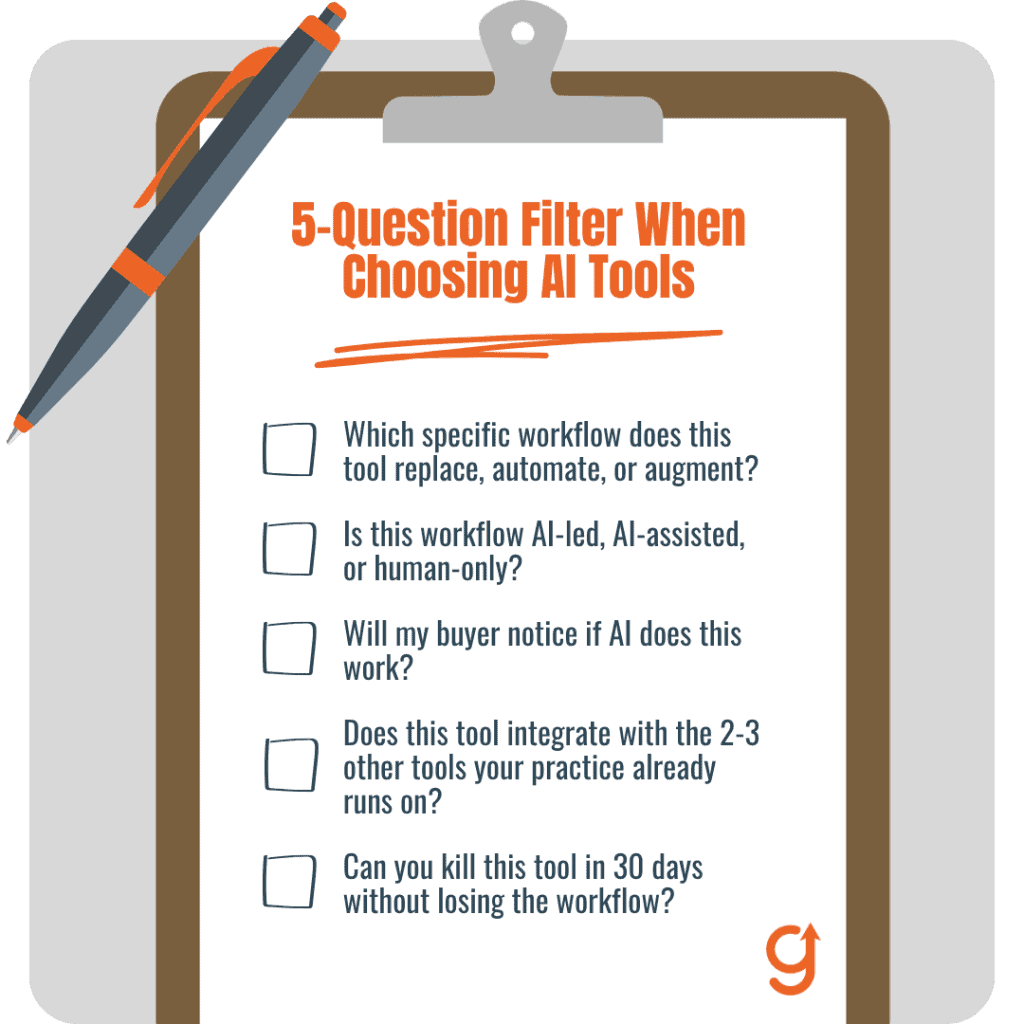
Before adding any AI tool to your stack, walk it through five questions. The filter takes about three minutes per candidate. Tools that pass all five are candidates. Tools that fail any one are out.
Question 1: Which specific workflow does this tool replace, automate, or augment?
Name the workflow in one sentence. If you can’t, the tool is solving a problem you haven’t yet articulated, which is a hype-buy. Examples that pass: “intake routing for inbound discovery calls,” “transcription of recorded client sessions,” “payment-reminder dunning sequences.” Examples that fail: “general AI productivity,” “AI marketing assistant,” “AI growth platform.”
If the workflow is fuzzy, your stack will be too.
Question 2: Is this workflow AI-led, AI-assisted, or human-only?
Per the AI Collaboration Matrix (a 2×2 framework that classifies tasks before you open a chat window). AI-led workflows are pattern-heavy and operational. AI-assisted workflows have you in the loop; the AI accelerates a draft. Human-only workflows are judgment-heavy or voice-bearing.
If the answer to this question is “human-only,” no tool belongs there, regardless of how clever it is.
Question 3: Will my buyer notice if AI does this work?
Two ways to answer. Would they notice during the engagement (mid-call, mid-message, mid-session)? Would they notice if a peer reviewed the output six months later? If the answer to either is yes, the tool fails. The threshold is not whether the tool produces quality output.
The threshold is whether your buyer’s filter for “is this who I thought it was” survives the tool’s involvement. Premium positioning depends on that filter staying intact.
Question 4: Does this tool integrate with the 2-3 other tools your practice already runs on?
Coaching practices die from integration friction, not from AI shortcomings. A tool that does its job well but does not talk to your calendar, your CRM, or your payment processor creates manual hand-offs that erase the time savings. The integration question is a real test. If the answer is “yes, via Zapier or Make,” that counts.
If the answer is “you’d have to export a CSV and re-import,” the tool is out.
Question 5: Can you kill this tool in 30 days without losing the workflow?
Tools that lock you in are tools that own you. Look for monthly billing (not annual), export of data on cancellation, and the ability to swap the tool for a similar competitor without rebuilding the workflow. If the tool requires three months of custom training before it produces value, it fails this question; you cannot run a 30-day kill check on a tool that takes 90 days to install.
A tool that lands “named workflow, AI-led or AI-assisted, buyer would not notice, integrates with existing stack, killable in 30 days” passes all five and gets a 30-day install slot.
Anything that fails any of the five does not get a slot, regardless of how impressive the demo looked.
Which AI tools pass the filter for a coaching practice today?
Seven tools survive the filter for the typical solo or small-team coaching practice in 2026. Grouped by the workflow they own:
Scheduling and intake routing: Calendly (or TidyCal, or SavvyCal)
Replaces manual back-and-forth scheduling and routes inbound enquiries to the right session type (discovery call, returning-client booking, paid strategy intensive). AI-led on routing logic, fully buyer-invisible (buyers don’t care HOW you scheduled, only that you did), integrates with every calendar and CRM in the category, killable in 30 days because the workflow is portable.
Pricing $0 to $30 per month per coach. The highest-leverage first install for almost any practice.
Transcription and session notes: Fireflies.ai (or Otter.ai)
Replaces manual note-taking during recorded client sessions. AI-led on transcription, AI-assisted on summary (you read and edit before anything reaches the client). Buyer-invisible if you treat the transcript as internal raw material and write your own session-follow-up from it.
Integrates with Zoom, Google Meet, Microsoft Teams. Killable in 30 days. Pricing $10 to $30 per month per user.
Coaching-aware CRM: Paperbell (or HubSpot free tier)
Replaces a spreadsheet client database plus scattered scheduling, contracts, and invoicing. AI-assisted on data hygiene and reminder sequences. Buyer-invisible at the CRM layer (they only see the client portal, not the back end). Integrates with Stripe and the major calendar tools.
Killable in 30 days but with a data-export step. Pricing $50 to $100 per month for solo practices.
Invoicing and payment automation: Stripe with automated reminders
Replaces manual invoice creation, payment chasing, and dunning sequences. AI-led on automation, buyer-invisible. Built into most CRM tools above. Verify Stripe is your long-term processor before going deep; migration friction is real. Effective pricing is the transaction percentage.
Internal knowledge base and note-tagging: Notion AI
Replaces scattered Docs and Notes for client research, internal SOPs, and your own thinking. AI-led on tagging and search, AI-assisted on synthesis. Buyer-invisible unless you choose to share. Killable in 30 days (Notion exports cleanly). Pricing $10 to $20 per month.
Operator-led general LLM: Claude (or ChatGPT)
Augments research synthesis, pressure-testing offers and positioning, and drafting internal SOPs. Strictly AI-assisted, never AI-led on buyer-facing work. Killable instantly. Pricing $20 per month per seat. The discipline is “the LLM never writes for the buyer in my voice.”
That discipline is what separates this tool from a commodity-content trap.
Workflow orchestration: Make.com (or Zapier)
Replaces manual hand-offs between the tools above. AI-led on routing, buyer-invisible, integrates with everything by definition. Killable but with workflow-rebuild friction; document your flows. Pricing $0 to $30 per month.
Seven tools. Roughly $150 to $400 per month total. Two to three integration tasks once the stack is set up. The pattern is restraint, not breadth.
Which AI tools should a coaching practice avoid, and why?
These tools are common in vendor pitches and listicles, and they fail the filter. Naming them helps you say no when the next ad rolls past.
Voice-clone platforms (CoachVox, Personify, Delphi, ElevenLabs-based services) fail Question 3. The whole point of the tool is to put a synthetic version of your voice in front of buyers. The buyer-detection threshold is exactly the threshold the tool crosses. Premium positioning depends on the prospect believing they’re getting access to you.
A clone that gets it 95% right gets caught by the 5% that does not, and the premium evaporates. The vendors’ counter-argument is “but it sounds like you.” That is precisely why it fails the filter.
AI cold-outreach personalizers (Smartlead, Apollo AI personalization, similar) fail Question 3 at the first touch. The premium coach’s outreach reply rate depends on the prospect feeling that one specific human read their LinkedIn and decided to reach out. AI personalization is designed to scale that feeling; it actually fakes it.
Buyers detect this within two emails. Skip.
AI content writers in your voice (Jasper, Writesonic, Copy.ai) fail Question 3 across every voice-bearing surface. LinkedIn posts, articles, newsletters, sales emails, anything labeled with your name. The same content writers can be used as AI-assisted brainstorming partners (Question 2 verdict: AI-assisted, operator finishes), but they fail the moment they become AI-led on a buyer-facing surface.
Automated session summaries that ship to clients without your edit (built into some transcript tools) fail Question 2 and Question 3. Session follow-ups are the artifact that proves the coach was paying attention. A summary that goes directly from AI to client betrays the personal-attention promise that justified the engagement. Keep the transcript tool. Always edit before sending.
Prospect-screening bots that replace discovery calls (Drift-style chatbots configured to qualify out prospects) fail Question 2. The discovery call is the human-only workflow par excellence in a coaching practice. A chatbot can route inbound, schedule, gather a few intake answers; it cannot run the diagnostic conversation that closes a high-ticket engagement.
Routing is AI-led. Qualification is human-only.
The avoid list is not a moral argument. These tools work technically. They erode the premium by definition. That is the filter doing its job.
How do you install your first 3 AI tools without creating sprawl?
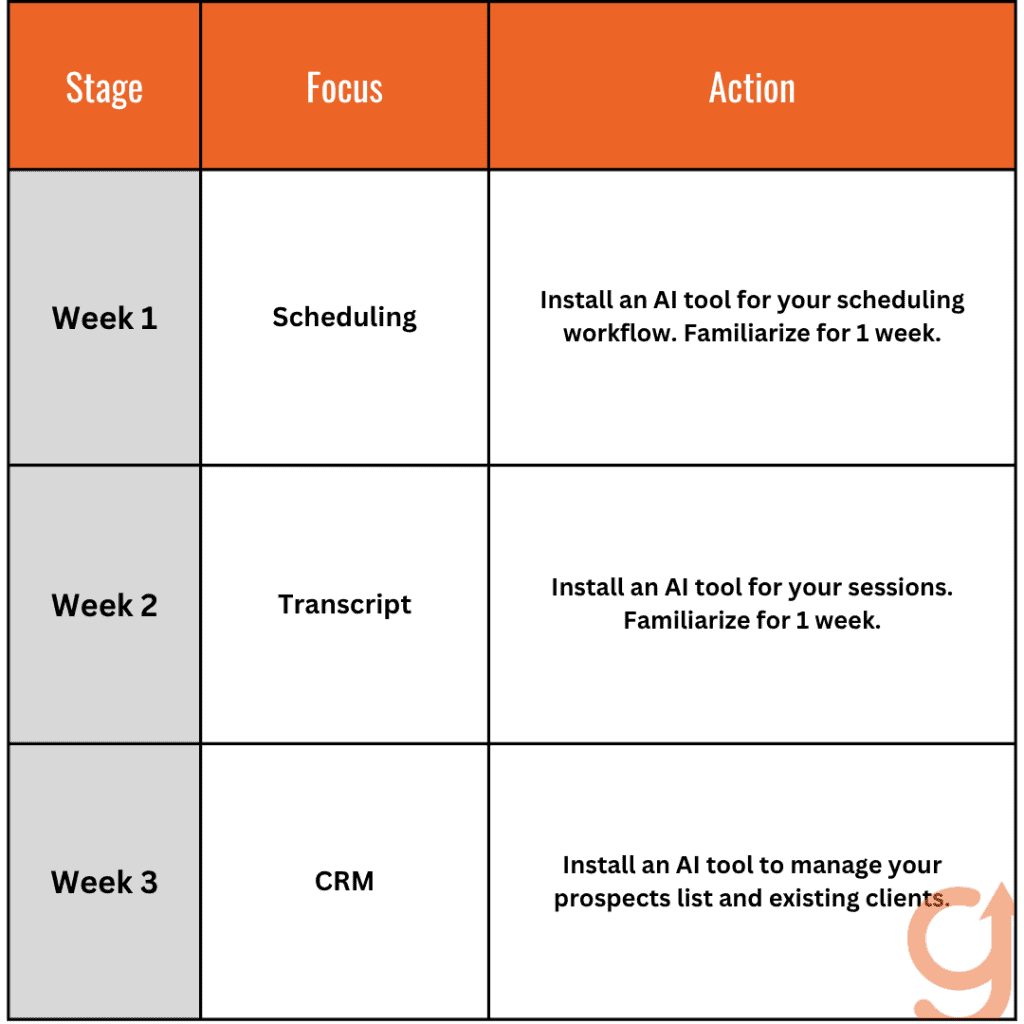
One tool per week for three weeks, then a 30-day kill check before the fourth. Coaches who buy five tools in a weekend ship one. Coaches who install one per week ship all of them. The cost of getting this wrong is measurable: 56% of CEOs report no revenue nor cost benefits from AI investments, according to PwC’s 2026 Global CEO Survey.
The rhythm below keeps a solo practice off that list.
Here’s the content placed into a table (original text unchanged):
- Week 1: Install the scheduling layer first
Calendly with intake-form routing for inbound. Highest-leverage first install: returns the most hours per dollar, integrates with everything you’ll add later, removes a real friction your prospects feel. Configure the intake-form fields you’ll actually use; refine after week 4. - Week 2: Install the transcript layer
Fireflies or Otter, configured to auto-record sessions if your client agreements permit. Treat the output as internal raw material. The hours you save go into follow-up quality, not into more sessions. - Week 3: Install the CRM layer
Paperbell or HubSpot’s free tier. Import existing client and prospect lists. Configure automated reminders for sessions and payment due dates. Wire it to the scheduling tool from week 1 and Stripe. - Days 22 to 51: Kill check, then add #4
Run the three tools for thirty days without adding anything. For each, ask three questions: did it return the hours it consumed, did anything in your buyer-facing work get worse, is the workflow still painful enough to need another tool. If all three answers are clean, add the fourth (probably Notion AI or the LLM). If any failed, kill it before adding more.
The discipline is the rhythm, not the tools. The same seven installed in a weekend produce sprawl. Installed one per week with a kill check at week four, they produce a stack.
How do these AI tools fit alongside your existing coaching stack (CRM, calendar, billing)?
Most coaching practices already run on a 3-tool core: a calendar, a payment processor, and either a CRM or a spreadsheet pretending to be one. The AI stack above fits inside that core, not next to it.
The scheduling tool replaces or upgrades your calendar layer. The CRM layer (Paperbell or HubSpot) replaces or upgrades the spreadsheet-pretending-to-be-a-CRM. The invoicing automation runs on top of your existing payment processor. The transcript layer slots beside your video tool.
The internal knowledge base (Notion) replaces scattered Docs and Notes. The LLM and the workflow orchestrator are net-additions, not replacements.
The friction pattern is treating AI tools as a parallel stack: two CRMs, two scheduling systems, two places client notes live. Pick one per category and migrate. Two months of dual-system pain is cheaper than two years of integration debt.
What is the right budget for an AI tool stack in a coaching practice?
For a solo practice, $150 to $400 per month covers the seven-tool stack above. The variance is in the CRM tier (Paperbell at the lower end, HubSpot paid tiers at the higher end if your client list is larger) and whether you pay for premium tiers of the scheduling and transcript tools.
For a small-team practice, add $20 to $40 per seat per month on the transcript and LLM tools.
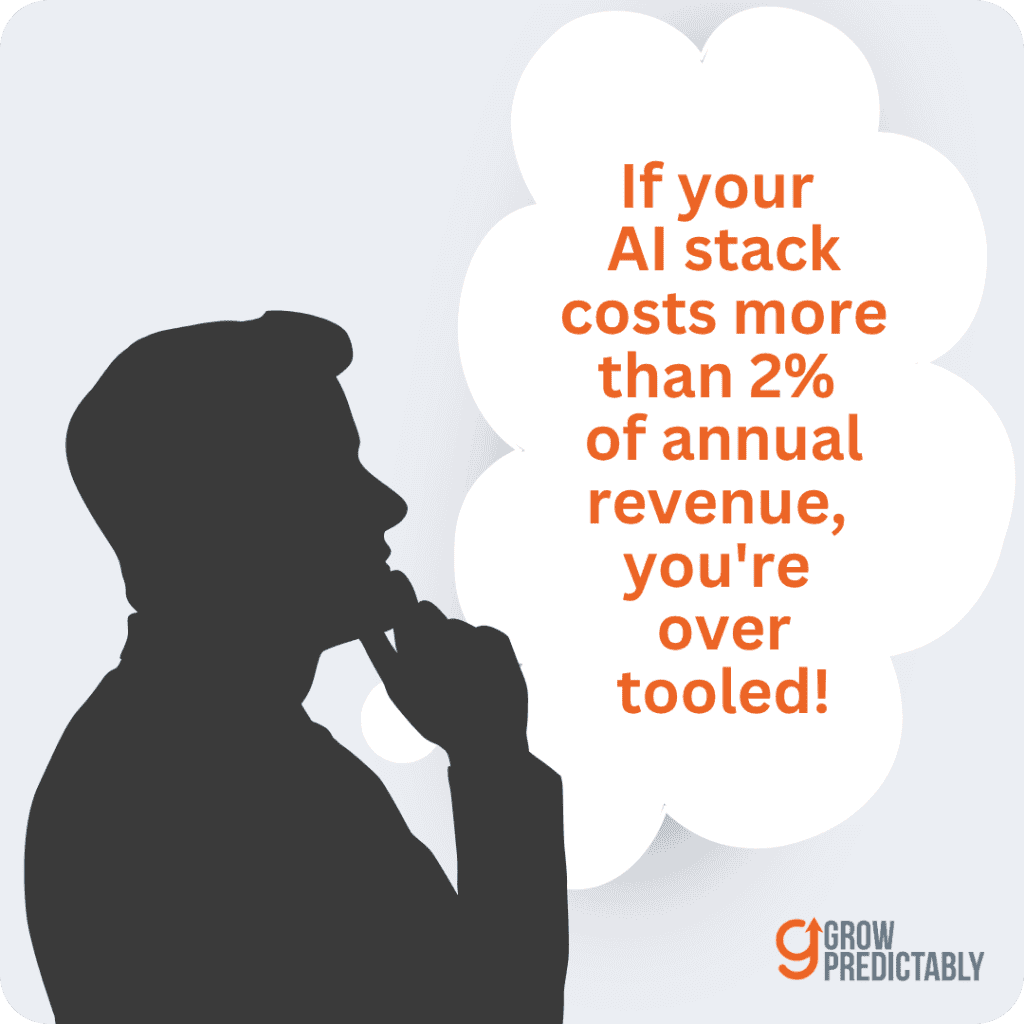
The honest signal: if your AI stack costs more than 2% of annual revenue, you’re over-tooled. A solo coach doing $400k per year should spend $300 to $700 per month at most. Above 2% means you have tools you do not actually use.
When should you NOT add another AI tool?
Stop adding tools when:
- Your last installed tool has not been audited in 30 days. Audit first, add later.
- You can’t name the workflow the new tool would own in one sentence. Hype-buy.
- The new tool overlaps with a tool already in your stack by more than 40% of features. Sprawl.
- You’re adding the tool because a peer recommended it without you running the filter on it first. Discipline.
- You’re in the middle of a positioning shift or offer redesign. Stabilize first.
The discipline of NOT adding a tool is the discipline of saying yes to the few that earn their place. Steve Jobs put it in three words at Apple’s 1997 developer conference: “Focusing is about saying no.” A coaching tool stack works the same way. The seven above earn their place for most practices in 2026. The rest do not.
How does this tool decision sit alongside the rest of the coach plus AI work?
This article picks the tools. The pillar piece on AI for a coaching business decides whether to use AI at all and which workflows it belongs in. The AI Collaboration Matrix (a 2×2 task classifier that tells you when AI should and shouldn’t sit in your workflow) is the framework the 5-question filter compresses.
The other supporting articles in this cluster cover the deep dives this piece deliberately left out:
- How to automate practice operations is the workflow-level implementation guide for the tools listed above.
- How to use AI on content without sounding generic covers the content-specific application of the AI-assisted (never AI-led) discipline.
- Practice-management workflow setup for mindset coaches covers the niche-specific shape.
- Scaling a strategist-coach practice with AI covers the parallel question for strategist-coach segments.
- Using AEO to attract premium clients covers the answer-engine optimization play for getting found by buyers already in evaluation mode.
The tools choose themselves once the methodology is set. The methodology, not the tools, is the game.
What are the most important AI tools for a coaching practice in 2026?
A scheduling tool, a transcript tool, a coaching-aware CRM, invoicing automation, an internal knowledge base, an operator-led LLM, and a workflow orchestrator. Seven tools, $150 to $400 per month for a solo practice. None appear on the buyer-facing surface.
How many AI tools should a solo coach actually run?
Closer to 5 than 18. The marginal value of the 18th tool is negative; integration friction eats the time it saves. The seven-tool stack above is the upper limit for most solo practices. If you can run with fewer (skip the workflow orchestrator if your stack is small enough to manually hand-off), do.
Are paid AI tools worth it for a coaching practice, or is ChatGPT enough?
ChatGPT (or Claude) alone covers research synthesis and pressure-testing, but it does not schedule, transcribe, invoice, or manage clients. For a one-client side practice, the free LLM is enough. For a 5-plus client active practice, the operational tools (scheduling, CRM, transcript) return more hours than they cost within sixty days.
Which AI tool should a coach buy first?
The scheduling layer with intake routing. It returns the most hours, integrates with everything you’ll add later, removes a friction your prospects already feel, and costs less than $30 per month. Install it before the LLM, before the CRM, before anything else.
How do I avoid AI tool sprawl in my coaching practice?
One tool per week for the first three weeks, then a 30-day kill check before installing the fourth. Audit the existing tools every quarter against the 5-question filter. Kill any tool that has not returned its monthly cost in the last 90 days. The discipline is harder than the install.
Can my coaching clients tell when I am using AI tools, and what should I do about it?
For the seven tools above, no. They sit behind your practice, not on top of it. For voice-clones, AI cold-outreach, and AI content writers in your voice, yes (and the premium erodes). The dividing line is whether the tool produces output the client directly receives. If it does, the discipline is “human-only or AI-assisted with edit,” never AI-led.
Keep in mind, consumers can tell when AI is in the mix. A SurveyMonkey research on AI in customer service revealed that 54% of consumers are confident they can identify when they’re interacting with AI, while 47% believe they can identify AI-generated content.
How long should I trial an AI tool before deciding to keep it?
Thirty days, with a written kill criterion at the install. If the tool has not returned the time it consumed in 30 days, kill it. If it returned the time but the time did not show up in higher-leverage work, kill it (the saved time was theoretical, not real). The kill discipline matters more than the install discipline.
Where do you start picking your first AI tool?
Pick the scheduling layer. Install it this week. Configure the intake-form routing for inbound discovery calls. Wire the calendar links into your website and your LinkedIn bio. Spend the hours it returns this month sharpening the discovery-call script that converts the bookings into engagements.
That is the entire entry. The other six tools follow on a known rhythm.
If you want a second pair of eyes on which workflows in your practice would benefit most from this stack (and which would erode your premium), I run 30-minute diagnostic calls with high-ticket B2B coaches and consultants on this exact decision. You can book one here.
Frequently Asked Questions About AI Tools for Coaching Practices
What AI tools should a high-ticket coaching practice actually use?
Seven tools pass the 5-question filter for most solo or small-team practices in 2026: a scheduling layer with intake routing, a transcription tool for session notes, a coaching-aware CRM, invoicing and payment automation, an internal knowledge base, an operator-led general LLM used only for internal work, and a workflow orchestrator connecting them. None of the seven sit on a surface the buyer can see.
What is the 5-question filter for evaluating an AI tool for a coaching practice?
Before adding any tool: name the specific workflow it replaces, classify that workflow as AI-led, AI-assisted, or human-only, ask whether the buyer would notice AI doing the work, confirm the tool integrates with the calendar, CRM, and payment processor already in use, and check that it can be killed within 30 days without losing the workflow. A tool that fails any one of the five does not get a slot in the stack.
Which AI tools should a coaching practice avoid?
Voice-clone platforms, AI cold-outreach personalizers, AI content writers that draft in the coach’s voice, automated session summaries that ship to clients without an edit, and prospect-screening bots that try to replace the discovery call. Each one fails the buyer-detection question, because a premium coaching relationship depends on the buyer getting the coach, not a synthetic stand-in.
How much should a coaching practice budget for its AI tool stack?
Roughly $150 to $400 per month for a solo practice running the seven-tool stack, with an added $20 to $40 per seat for a small team. A useful ceiling is 2% of annual revenue; spending meaningfully more than that usually signals tools the practice is not actually using.
How should a coach install AI tools without creating sprawl?
One tool per week for the first three weeks, starting with the scheduling layer, then the transcript layer, then the CRM, followed by a 30-day kill check on all three before adding a fourth tool. Coaches who buy five tools in a weekend tend to ship one of them; coaches who install one tool per week tend to ship all of them.
Which AI tool should a coach install first?
The scheduling layer with intake-form routing. It returns the most hours for the least cost, typically under $30 a month, integrates with everything installed afterward, and removes a friction point prospects already feel before any other tool is in place.
About the author
Brian helps B2B founders install marketing + automation engines powered by Co-Thinking with AI. With 15+ years building predictable revenue systems, he's worked with SaaS, agency, and service businesses on 90-day done-with-you growth accelerators.
Ready to see your real growth gap?
Two minutes in the Growth Gap Scan and you walk away knowing the one thing capping your pipeline. Free, no obligation.