B2B SaaS Marketing Automation: Remove Revenue Friction

Founder, Grow Predictably · 15+ yrs building B2B revenue systems
TL;DR: B2B SaaS marketing automation improves efficiency when it removes a specific delay, duplicate decision, or broken handoff. Define the workflow’s input, decision rule, action, owner, exception path, and feedback signal before configuring software. That design creates capacity without turning buyer communication into an unattended sequence.
Key Takeaways
- Start with one revenue constraint, not a platform feature list.
- Automate repeatable movement and known decisions. Keep interpretation, promises, and sensitive buyer conversations human.
- Write a Revenue Friction Contract before building the workflow.
- Measure elapsed time, rework, accepted handoffs, and buyer progression. Activity volume alone can reward a noisy system.
- Run the first workflow for 30 days, inspect every exception, and expand only after the error pattern is understood.
Marketing automation can create capacity, but capacity is not the same as progress. A workflow that sends twice as many messages while creating weak handoffs has made the team busier downstream. The practical question is not, “What else can this platform automate?”
It is, “Which repeated delay is preventing a buyer or teammate from taking the next useful action?”
What does marketing automation efficiency mean in B2B SaaS?
B2B SaaS marketing automation efficiency is the reduction of avoidable time, rework, and decision delay inside a revenue workflow. It occurs when software moves reliable information, applies an agreed rule, or triggers a defined action faster than the team can do it manually. The gain is real only if the next person receives usable context and the buyer receives a relevant response.
That definition is narrower than “doing more with less.” Volume can rise while performance falls. For example, an automated lead-routing rule might save ten minutes per record, then cost sales hours because the routing logic ignored territory, account ownership, or buying state. The time saved at one step simply moved into cleanup.
The upside is still material. Salesforce’s Tenth Edition State of Marketing surveyed 4,450 marketers. In that Salesforce study, teams deploying AI reported 20% higher marketing ROI, 19% higher conversion rates, and 19% lower marketing costs.
Those aggregate findings are not a promised lift for any one workflow. They show why disciplined automation deserves attention while leaving the implementation burden intact.
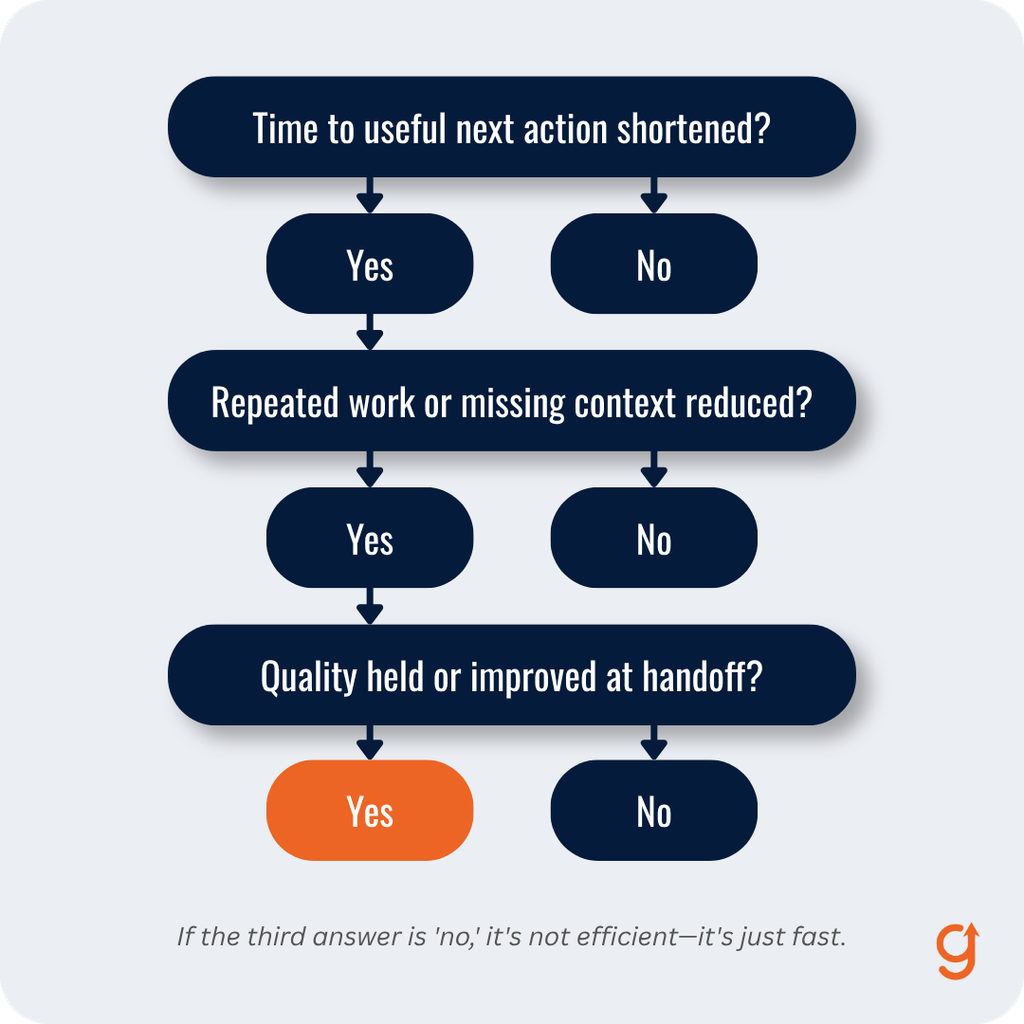
Use a three-part test:
- Did the workflow shorten the time to a useful next action?
- Did it reduce repeated work or missing context?
- Did quality hold or improve at the next handoff?
If the answer to the third question is no, the workflow is not efficient. It is merely fast.
Where does revenue friction hide?
Revenue friction appears where work waits, context breaks, or the same judgment gets recreated. It can be seen before it can be measured. Here are a few signs to look for. Marketing exports a list every Friday. Sales asks what a lead downloaded. A webinar attendee enters three overlapping sequences. A high-fit account submits a form, but the assigned rep sees it the following day.
A campaign report takes longer to reconcile than the decision it is meant to support. Each looks minor alone. Together, they show where a buyer or teammate is waiting for the next useful action.
To find the friction, start by mapping one buyer path from observable event to useful response. Do not begin with every tool or lifecycle stage. Record the delay, the workaround, and the consequence. The list below pairs each friction point with the evidence to look for and the job automation can take on.
- Form to CRM: Records wait or arrive incomplete. Automate: normalize fields and create the record. Keep human: decide whether the offer fits the account.
- Signal to route: High-value activity sits in a queue. Automate: apply ownership and urgency rules. Keep human: interpret ambiguous intent.
- Nurture to sales: A score arrives without context. Automate: assemble the evidence packet. Keep human: choose the conversation and promise.
- Campaign to learning: Reports require manual joins. Automate: refresh agreed metrics. Keep human: decide what the evidence means.
This map also prevents overlap with a broader marketing automation readiness audit. Readiness asks whether the data, integrations, ownership, and governance can support automation. The friction map asks which constrained movement deserves to be automated first.
A useful friction statement has four parts: “When this event occurs, this work waits for this reason, causing this consequence.” For example: “When a pricing-page visitor from a target account requests the implementation guide, ownership waits for a daily list export, causing a next-day response with no record of the pages reviewed.” That is specific enough to redesign. By contrast, “lead follow-up is slow” is not.
Which workflow should you automate first?
Choose the workflow with frequent repetition, stable inputs, a clear next action, and a visible cost of delay. Avoid starting with the most impressive demonstration. A small workflow that reliably removes an hour of daily reconciliation is a stronger first build than an elaborate branching sequence nobody can explain.
Score candidates from one to five on five factors:
- Frequency: A high score means the event occurs often enough to matter.
- Rule stability: A high score means the decision can be written without guessing.
- Delay cost: A high score means waiting creates buyer, pipeline, or team harm.
- Data readiness: A high score means required fields are present and trustworthy.
- Reversibility: A high score means a bad action can be caught and corrected safely.
Prioritize a high total with no severe safety weakness. However, treat data readiness and reversibility as vetoes, not bonus points. A frequent task built on unreliable data will create frequent errors. Likewise, a workflow that can make an irreversible promise should not run without human approval.
Good first candidates include standardizing inbound records, assigning known-fit accounts, alerting an owner to a high-confidence signal, creating a sales handoff packet, suppressing contacts after a reply, and refreshing a fixed reporting view. Each moves known work under known rules.
Weak first candidates include interpreting vague buying intent, generating unsupervised claims, choosing whether an account is strategically important, changing pricing, or sending a sensitive response after a complaint. Those tasks depend on context the system may not hold.
Example: A team comparing two first workflows should choose automated suppression after a direct reply over AI-based intent classification. Suppression has a stable event, a safe action, and an obvious failure test. Intent classification can wait until the team has labeled examples, a confidence threshold, and a review queue.
Keep the buyer-state lead nurturing workflow separate from the automation that supports it. The nurture model decides which evidence changes the buyer’s path. Automation records the evidence, applies approved transitions, and assembles context. It should not invent the buyer state because someone opened an email.
How do you design a workflow that stays reliable?
Write a Revenue Friction Contract before opening the workflow builder. The contract forces the business logic into plain language so marketing, sales, and operations can challenge it before software makes the mistake faster.
1. Input
Name the exact event and required fields. “A lead engages” is too loose. “A known contact at a target account submits the implementation-guide form with business email, account domain, and consent captured” is testable.
2. Decision
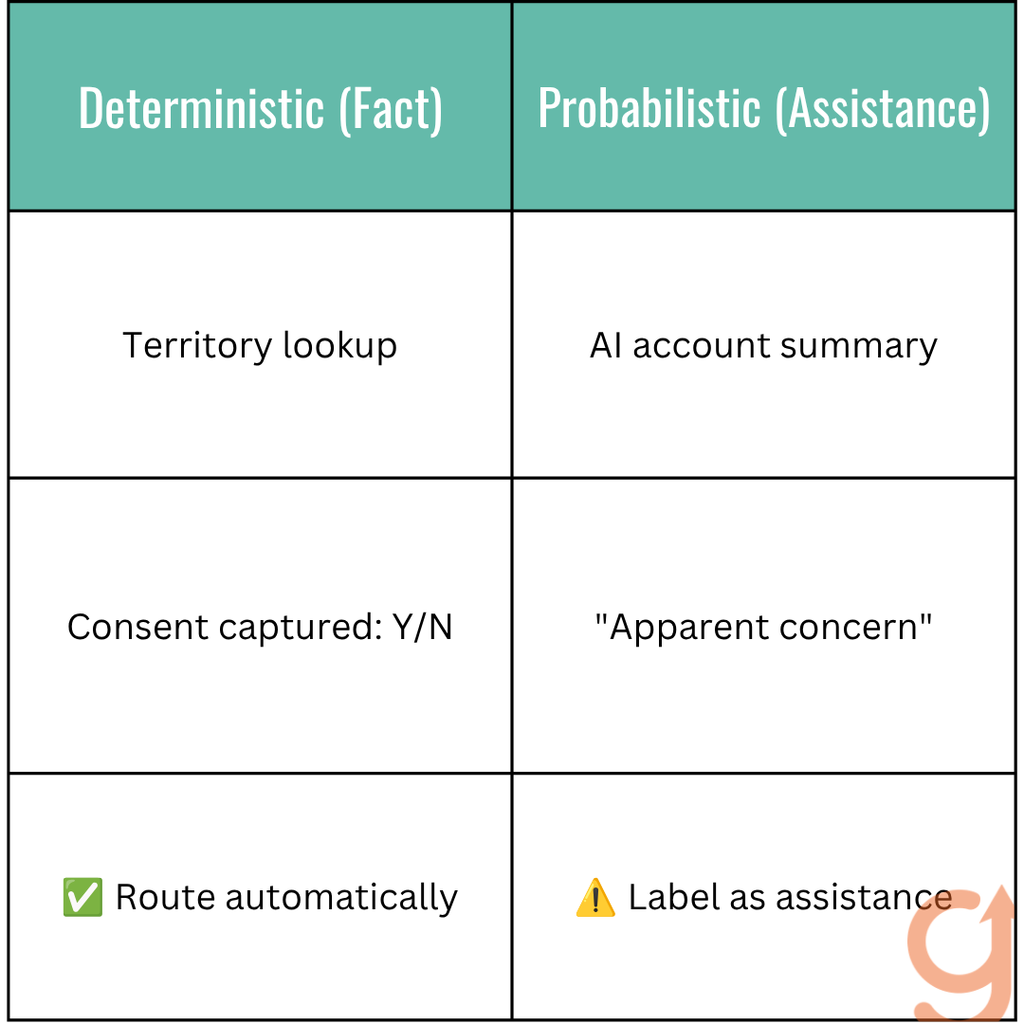
Write the rule that selects the path. Use data the system actually owns. Then separate deterministic rules from probabilistic assistance. A territory lookup is deterministic. An AI summary of an account’s apparent concern is probabilistic and should be labeled as assistance, not fact.
The distinction is explained more fully in AI versus marketing automation.
3. Action
Choose the smallest response that removes the delay. Create the record, assign the owner, suppress a conflicting sequence, or assemble a brief. Do not add messages simply because the platform can send them.
4. Owner
One person owns the workflow’s result. Ownership includes reviewing failures, approving rule changes, and deciding when the workflow should stop. “Marketing ops” is a team label, not an accountable owner.
5. Exception
Define the conditions that pause automation. Missing consent, conflicting account ownership, an existing opportunity, a customer support issue, an uncertain classification, or a promised custom response should exit to a human queue. The exception path is part of the workflow, not an edge case to add later.
6. Feedback
Name the signal that will prove the constraint moved. Measure the time from event to accepted action, the percentage of handoffs accepted without clarification, exception volume, and downstream rework. If no feedback returns, the workflow cannot improve safely.
Here is a worked example:
- Input: A known contact from a target account requests an implementation guide.
- Decision: The account has no open opportunity, the contact has consented, and two high-intent actions occurred within 14 days.
- Action: Create an evidence packet, alert the assigned rep, and pause generic nurture for 48 hours.
- Owner: Revenue operations owns the rule. The assigned rep owns the response.
- Exception: Conflicting ownership, missing consent, an open support issue, or uncertain account match routes to manual review.
- Feedback: Track median response time, handoff acceptance, clarification requests, and recycle reason.
The first version may expose missing fields or ambiguous ownership. That is useful because it reveals the real constraint before scale hides it. Suppose the example workflow routes six of ten test records to manual review because the CRM cannot distinguish customer domains from prospect domains.
Adding more branches would multiply uncertainty. Instead, add or repair the account-type field, rerun the ten records, and confirm that the exception rate falls for the right reason.
This failure-and-recovery test should happen before activation. Use three test sets: ordinary records that should pass, boundary cases that should pause, and disallowed records that should never enter. Ask the receiving owner to explain each result without looking at the workflow builder. If the result cannot be understood from the contract, the logic is not ready.
The companion B2B SaaS sales cycle can clarify which team owns the next decision when the workflow crosses from research support into an active sales process.
Where must human judgment stay in the loop?
Human judgment should remain wherever the work interprets ambiguous intent, changes a commercial promise, handles sensitive context, or represents the company in a consequential conversation. In those cases, automation can prepare the evidence and enforce the pause.
A person should decide what the evidence means and what the company is willing to promise.
That boundary matters because buyers do much of the decision work before sellers see them. The 6sense 2025 B2B Buyer Experience Report studied nearly 4,000 buyers. The same 6sense study found that the winning vendor was on the Day One shortlist in 95% of purchases and that buyers initiated 79% of first engagements.
An irrelevant automated response can damage a preference that formed before the account entered a visible sales process.
Buyers are choosing a preliminary winner much earlier than they have in the past.
Kerry Cunningham, Head of Research and Thought Leadership at 6sense
For that reason, use a human approval gate when the workflow will:
- infer motivation from weak or conflicting signals
- send a custom claim, recommendation, price, or timeline
- change opportunity status or account ownership
- respond to dissatisfaction, security, legal, or implementation concerns
- publish content or represent a named employee
The goal is not to keep people inside every routine step. It is to put judgment at the few points where context changes the decision.
How should you measure automation efficiency?
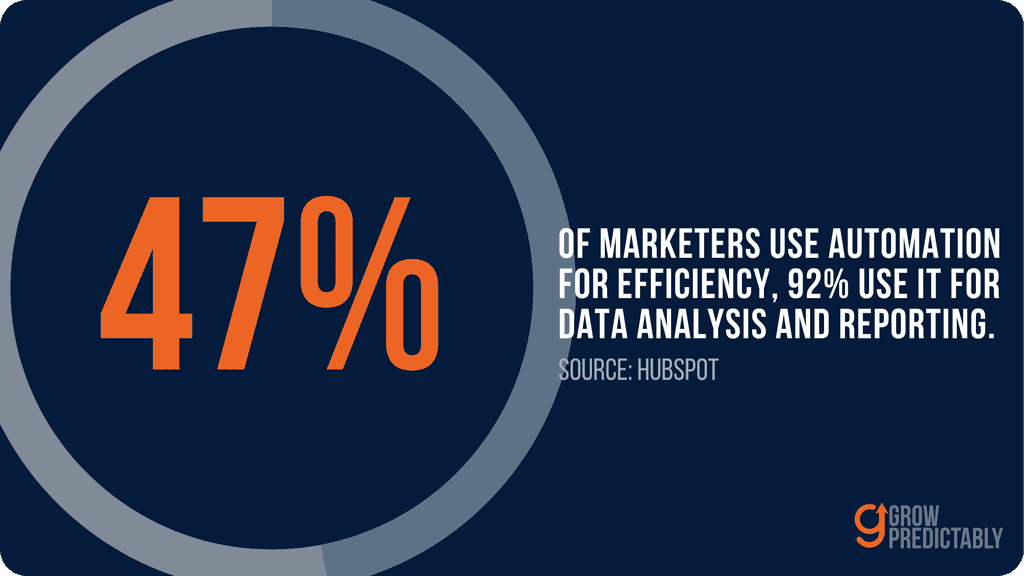
Measure the constraint the workflow was built to remove. HubSpot’s 2026 marketing statistics report that 47% of marketers use automation to make marketing processes more efficient and about 92% use it for data analysis and reporting. Adoption explains why teams need a better measurement standard. It does not prove that any specific workflow works.
Use a balanced scorecard:
- Event-to-action time: Reveals whether the delay fell. Supports the decision to keep, repair, or redesign the trigger.
- Accepted handoff rate: Reveals whether the next owner trusts the output. Supports the decision to improve context or qualification rules.
- Exception rate: Reveals whether the rule covers normal work. Supports the decision to add a rule or keep judgment human.
- Rework minutes: Reveals whether speed created cleanup. Supports the decision to fix data and action quality.
- Buyer progression: Reveals whether the workflow supported a meaningful next state. Supports the decision to change the content, timing, or path.
- Suppression failures: Reveals whether conflicting outreach escaped. Supports the decision to tighten stop rules before scaling.
Compare a baseline period with the first 30 days. Also record volume and mix so a quieter month does not look like an efficiency gain. Review medians rather than averages when a few extreme cases can distort response time.
Example: If median event-to-action time falls but clarification requests rise, the trigger became faster while the handoff became weaker. Keep the time gain only after the evidence packet is repaired. If exception volume rises because the workflow is correctly catching customer accounts, keep the exception and repair the upstream account classification.
Do not lead with emails sent, tasks created, or hours theoretically saved. Those metrics describe system activity. Connect capacity to an operating outcome: faster accepted handoffs, fewer clarification loops, cleaner reporting, or more buyers reaching the next verified state.
A sales enablement system should use the same evidence so marketing and sales do not maintain competing definitions of readiness.
What should a lean team do in the first 30 days?
Week one: Map one path and write three friction statements. Choose the candidate with stable rules, ready data, meaningful delay cost, and a safe exception path.
Template: When a named event occurs, the work waits because a named input, rule, or owner is missing, which causes a specific buyer or operating consequence. Use that sentence to keep the first build tied to one constraint.
Week two: Write the Revenue Friction Contract with the person who receives the output. Test it against ten recent records. Every disagreement becomes a rule clarification or a human exception.
Week three: Build the smallest workflow in the current stack. Run it in observation mode first when possible. Compare what it would do with what the team actually chose.
Week four: Activate the bounded workflow, inspect every exception, and compare event-to-action time, accepted handoffs, and rework with the baseline. Expand only if quality holds.
The best first automation is not the biggest build. It is the one constraint the team can name, control, and measure. If the hardest part is identifying that constraint, use the Growth Gap Scan to find where buyer progress or revenue work is stalling before adding another workflow.
Frequently Asked Questions
What should a B2B SaaS company automate first?
Start with a frequent workflow that has stable rules, ready data, a meaningful cost of delay, and a safe exception path. Good first candidates include record normalization, known-account routing, suppression after a reply, evidence-packet assembly, and fixed reporting refreshes. Avoid ambiguous or irreversible decisions.
How is marketing automation different from AI?
Marketing automation executes defined rules when known events occur. AI can assist with probabilistic work such as summarizing text or suggesting a classification. Treat AI output as an input that may require review, not as verified buyer intent or permission to make a consequential promise.
Which marketing tasks should not be automated?
Keep human judgment where the work interprets ambiguous intent, changes pricing or delivery promises, handles legal, security, support, or dissatisfaction issues, or represents a named person publicly. Automation can collect context and enforce a pause while the accountable owner makes the decision.
How do you calculate the ROI of marketing automation?
Compare the verified value of reduced cycle time, lower rework, and improved accepted handoffs with software, implementation, maintenance, and error costs. Use a baseline period and the first 30 days. Do not count theoretical hours saved unless the team actually redeploys that capacity.
Can a small B2B SaaS team automate without changing platforms?
Yes. Map one constrained workflow and build the smallest version in the CRM or marketing platform already in use. Test ordinary, boundary, and disallowed records before activation. A platform change is justified only when a verified requirement cannot be handled reliably in the current stack.
Does marketing automation always save money?
No. Automation can lower operating cost only when it removes more delay and rework than it creates in software, implementation, maintenance, exceptions, and cleanup. A fast workflow built on poor data may increase total cost. Measure downstream quality alongside the time saved.
About the author
Ready to see your real growth gap?
Two minutes in the Growth Gap Scan and you walk away knowing the one thing capping your pipeline. Free, no obligation.