AI vs Marketing Automation: When to Use Each (and When to Combine Both)

Founder, Grow Predictably · 15+ yrs building B2B revenue systems
TL;DR: AI and marketing automation solve different problems. AI predicts, scores, and chooses. Automation executes the same steps consistently once a trigger fires. The B2B SaaS answer isn’t pick one or pick both on instinct. It’s the workflow trichotomy: classify every recurring workflow as AI-led, AI-assisted, or human-only, set an evidence bar for each mode, and connect automation at the execution layer. Bolting AI onto automation without that classification system is the root cause of AI slop at scale.
Key Takeaways
- AI makes the decisions your team would otherwise make manually. Automation scales the decisions you’ve already made. The two layers serve different functions and misclassifying them is what drives undifferentiated output.
- The workflow trichotomy (AI-led, AI-assisted, human-only) gives every recurring marketing workflow a mode assignment, an evidence quality bar, and a named owner so teams stop asking ‘should we use AI here?’ and start asking ‘which mode does this workflow belong in?’
- Adoption is not the moat. Most marketing teams now own AI, yet the majority still ship generic campaigns because they never installed a decision layer. That gap is what mode classification closes, which makes it a strategic decision, not a tool preference.
- A marketing operating system ties each workflow mode to a Customer Value Journey stage. Execution-layer automation runs underneath all three modes, but AI intensity varies by stage: heavy at Aware and Convert, lighter at Advocate and Promote where claim credibility matters most.
- AI slop is a classification failure, not an AI quality failure. Teams that run AI-led mode on outputs where claim credibility matters (case studies, positioning, board reports) produce undifferentiated content. Setting an evidence bar per mode fixes this before it ships.
Every few weeks a B2B marketing leader tells me some version of the same thing: they bought the AI tools, wired them into the automation they already run, and the output still reads like everyone else’s. The tools are rarely the problem. What is missing is a decision about where AI belongs in the work and where it does not.
Get that decision wrong and you get AI slop at scale, with the model running flat-out on the exact outputs where being average is fatal. Get it right and the automation you already paid for starts firing on smarter inputs. This comparison is for the AI-era marketing leader who already has automation running and needs to find where AI amplifies the team versus where it just bolts on.
The diagnostic is workflow by workflow, not tool by tool, and it sits underneath the broader AI marketing strategy that amplifies your team instead of replacing it, the operating system this comparison feeds into.
What’s the difference between AI and marketing automation?
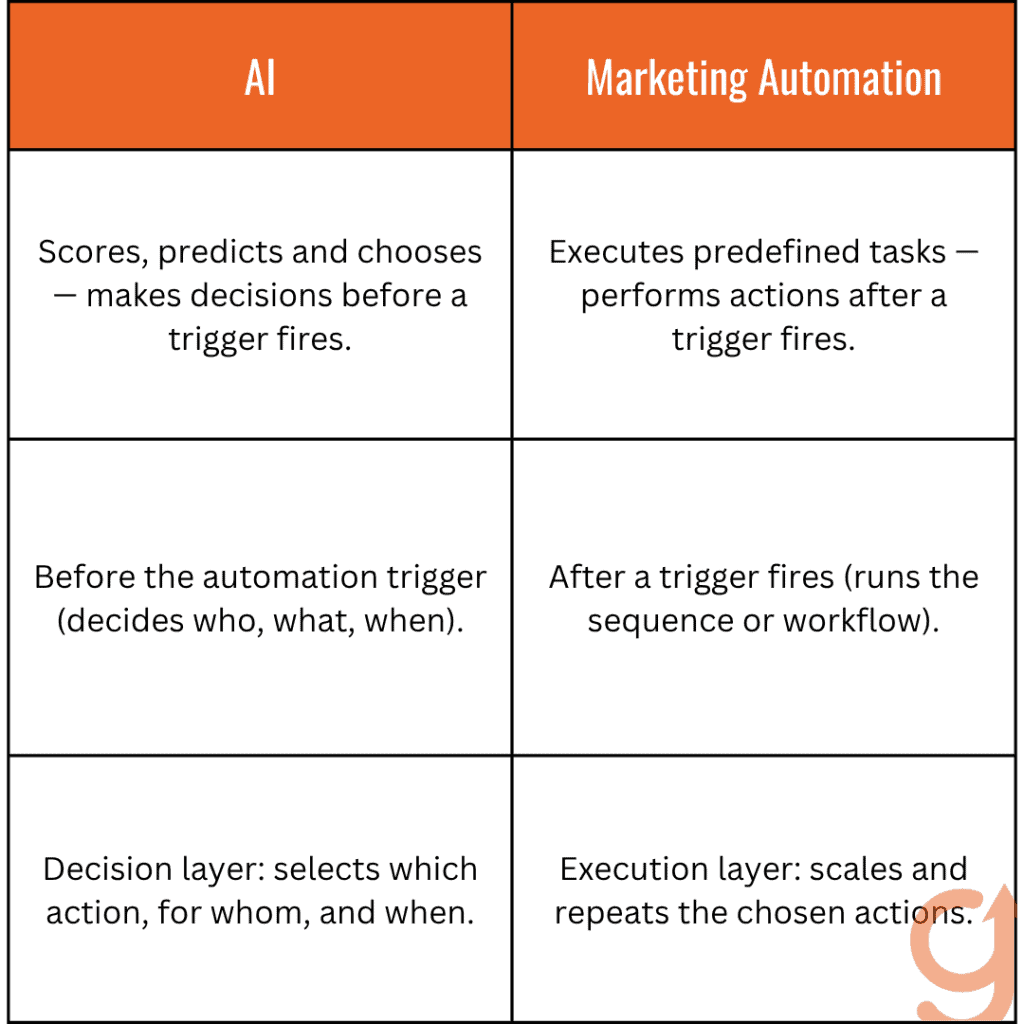
Marketing automation executes predefined tasks after a trigger fires. AI scores, predicts, and chooses before the trigger fires.
Automation handles “do the thing.” AI handles “pick which thing to do, for whom, and when.”
The key distinction is that automation scales what you have already decided, while AI makes the decision your team would otherwise make manually.
This distinction matters more now that everyone owns the AI. Salesforce’s State of Marketing 2026 found 75% of marketers have adopted AI, yet many still run generic campaigns. The teams stuck in that gap are bolting AI onto automation without a decision layer, so the model just produces the average of the field faster.
I see this confusion in almost every B2B marketing team I work with. They shop for “AI marketing tools” when what they are actually missing is a decision layer on top of the automation they already own.
Your marketing automation platform is not the problem. The problem is that it is firing the same nurture sequence for every inbound lead because nobody has connected a scoring model that tells it which leads deserve which sequence.
Here is how the layers actually work. Your automation sends a welcome sequence when someone fills a demo request form, and that is execution. The AI layer you are probably missing does three things before that sequence fires:
- Scores the form-filler against your ICP definition
- Routes high-fit leads to a sales-priority path and low-fit leads to a longer nurture path
- Adjusts the opening email content based on which page they came from
Same automation stack. Smarter input.
When I added an AI lead-scoring model on top of an existing marketing-automation stack, I did not replace anything. I connected the AI’s output to the automation’s input. The automation was already working. It just needed the decision layer telling it what to do.
Where do AI and automation live in your marketing workflows?
Automation belongs at the execution layer of every recurring workflow with a clear trigger and a defined output. AI belongs at the decision layer, wherever the workflow needs to score options, choose between paths, or predict an outcome before executing.
That decision layer amplifies the team rather than replacing it. Wharton professor Ethan Mollick, who runs controlled experiments on AI and work, draws the boundary plainly: “At least with the current set of AI tools, AI augments human capabilities.” Automation is the execution muscle. AI is the augmentation on the decision, and naming which is which is the whole job.
If you map this against the Customer Value Journey, you’ll see the pattern repeat at every stage.
Here’s what that mapping actually looks like in practice:
- Aware: AI clusters keyword opportunities and predicts which topics will rank. Automation publishes the resulting content on schedule. AI handles the strategic call. Automation handles the publish.
- Engage: AI scores content variants and personalizes by audience segment. Automation deploys the variants and tracks performance. Both layers.
- Subscribe: AI predicts which lead magnet a specific visitor is likely to convert on. Automation delivers the magnet and starts the nurture. Both layers.
- Convert: AI scores leads against your ICP definition and predicts purchase intent. Automation routes to the right sales sequence. Both layers.
- Excite: AI personalizes onboarding by usage pattern. Automation deploys the onboarding sequence. AI at the personalization step, automation at the delivery.
- Ascend: AI identifies expansion-ready accounts. Automation triggers the expansion playbook. Both layers, with human review of the playbook content before it fires.
- Advocate: AI clusters customer language from interviews. Automation distributes derivative content. AI-assisted at the clustering step, human-only at the publish, automation at the distribution.
- Promote: AI generates partner-asset variants. Automation distributes co-marketing materials. AI-assisted, human review, then automated distribution.
In my experience across B2B teams, every Customer Value Journey stage needs automation at the execution layer. The AI intensity varies. High-volume, pattern-rich stages like Aware, Engage, Subscribe, and Convert can carry heavy AI.
Claim-sensitive stages like Advocate and Promote need lighter AI and more human review. The framework doesn’t change. The mode intensity does.
When should I use AI alone, automation alone, or both?
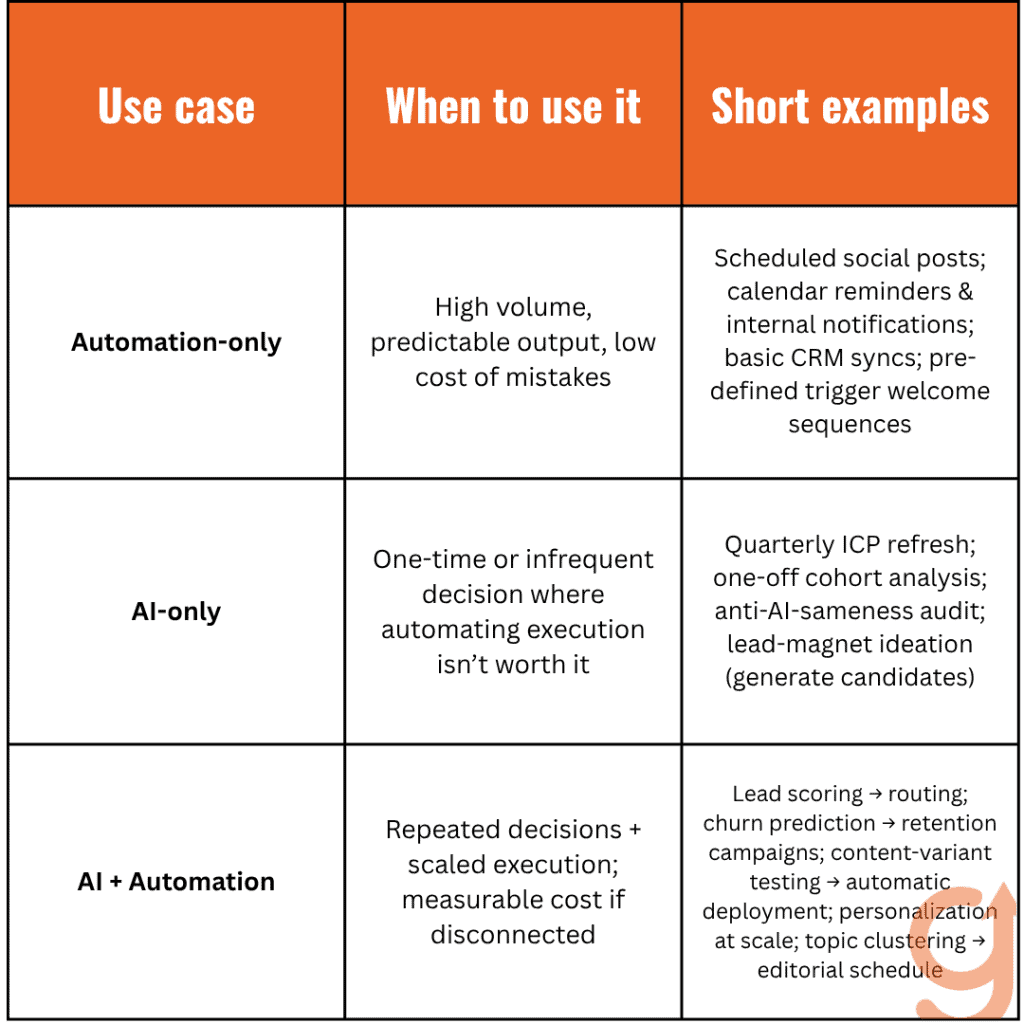
Use automation alone when the workflow is high-volume, the output is predictable, and the cost of a wrong execution is low. Use AI alone when you need a one-time decision, and the cost of automating the execution is higher than the value you’d get from it. Use both when the workflow needs decision-making and execution at scale, and the cost of running them disconnected is measurable.
I’ve seen it’s easier to apply this once you see the three buckets clearly.
Automation-only workflows are worth keeping standalone:
- Scheduled social posts where content is already approved with no per-post decision to make
- Calendar reminders, internal team notifications, and recurring reporting digests
- Basic CRM syncs (lead from form goes to contact in CRM)
- Trigger-based welcome sequences where the segment is already pre-defined
AI-only workflows worth keeping standalone:
- A quarterly ICP refresh where AI surfaces patterns from recent deal data, but the action is a one-time positioning revision, not an automated workflow
- A one-off cohort analysis to answer a specific strategic question
- Anti-AI-sameness audits, where AI scores your content against competitors, but the action is a one-time rewrite
- Lead-magnet ideation where AI generates 20 candidates and you pick 3
AI-plus-automation workflows where the combination is the point:
- Lead scoring, feeding sequence routing (AI scores, automation routes)
- Churn prediction triggering retention campaigns (AI predicts, automation fires)
- Content variant testing with winner deployment (AI scores variants, automation deploys)
- Personalization at scale (AI personalizes per recipient, automation sends)
- Topic clustering, feeding editorial calendar generation (AI clusters, automation schedules)
The test I apply: if the decision can be made once and the execution scales from there, AI alone works.
If the execution is already scaled and predictable, automation alone works. If you need the decision made repeatedly at scale, you need both connected.
How do AI and automation work together in a marketing operating system?
A marketing operating system is a document that classifies every recurring workflow by AI mode (AI-led, AI-assisted, or human-only) and ties each to a Customer Value Journey stage with a named owner and a defined evidence quality bar.
Automation runs underneath all three modes as the execution layer. Without the operating system, teams default to bolting AI onto whatever workflow is easiest to automate, which is how AI slop gets produced at scale. The same sprawl shows up in the tooling. Gartner’s 2023 martech survey found marketers use only about a third of their stack’s capability, as reported by MarTech.
An operating system is how you map every tool to a named workflow and stop paying for capability nobody deploys. The payoff from aiming AI at the right workflows is documented: McKinsey finds companies that invest in AI across marketing and sales see a revenue uplift of 3 to 15 percent, and the lift comes from pointing AI at the right work, not from adding more of it.
If you want a place to start, run your first workflow inventory using the Customer Value Journey as your map.
I’ve built this with several B2B teams, and every time the same four components turn out to matter.
1. Workflow inventory by AI mode. Every recurring workflow is listed and classified. Content production, lead scoring, email personalization, reporting, customer interview extraction, sales enablement creation, social distribution. This pass exposes overlap (three workflows producing similar output) and gaps (a customer-evidence workflow with no human-only owner).
2. Evidence quality bar per AI mode. AI-led mode bar: output passes a blind sameness test against three competitors. AI-assisted mode bar: includes a named client, a specific outcome with a number, and a citation. Human-only mode bar: operator judgment is the bar, no AI in the loop.
3. Tool-to-workflow mapping. Each tool in your stack is mapped to the workflows it serves. Tools that don’t serve a named workflow get cancelled. Most teams find they’re paying for two AI writing assistants and a video generator nobody touches.
4. Automation execution layer per workflow. For each classified workflow, name the automation tool that handles execution and the trigger that fires it. Lead scoring (AI-assisted, AI scores) goes into your marketing automation platform, which routes to the right sequence. Churn prediction (AI-assisted, AI predicts) connects to your lifecycle email tool, which fires the retention campaign.
With all four in place, the team stops asking “should we use AI here?” and starts asking “which mode does this workflow belong in?”
How do I integrate AI and automation without producing AI slop?
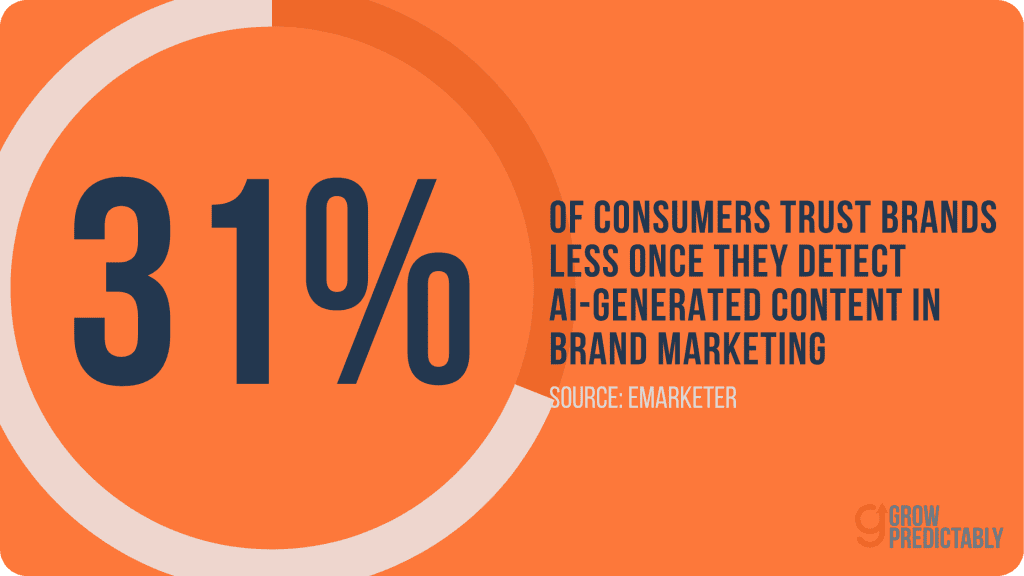
AI slop is what you get when AI-led mode runs on a workflow that should be AI-assisted or human-only. The output is undifferentiated, sometimes hallucinated, and often off-brand. The cost is real: when consumers notice AI-generated content in brand marketing, they are 4x more likely to trust the brand less than more, 31% versus 7%, reported by eMarketer from a December 2025 Klaviyo and Datalily survey.
Three operational rules stop it before it starts, and I’d rather you build these rules into your operating system rather than rely on catching slop after it ships.
Rule 1: Never run AI-led mode on outputs where claim credibility matters
Case studies with named clients, positioning paragraphs, board-level reports, customer-evidence content. Those are human-only. A hallucination in your case study costs you a client relationship, not just edit time. Automation can still execute these workflows (schedule the case-study publish, distribute the board report), but the content itself stays human-written.
Rule 2: Set an evidence quality bar before AI-assisted output ships
For long-form content, the bar might be: at least one named client, one specific outcome with a number, and one citation you can defend. For email sequences: passes a 30-second readback by a senior marketer who didn’t write it. The bar is what turns mode classification from a planning exercise into actual quality control.
Rule 3: Run a quarterly blind sameness test
Pull three competitor pieces on the same topic and three of your team’s pieces, strip the bylines, and give them to a senior marketing leader. Ask them to identify which are yours. The score should improve over time as your AI-mode discipline tightens. If it regresses as you scale AI volume, you’re running AI-led on workflows that should be AI-assisted.
I work by a simple standard that keeps the team honest: “I’m a strategist, not an editor of AI slop.” The operating system is what makes that true at scale.
What does the integration look like in practice?
Here is the shape this takes for a typical B2B SaaS team, so you can see how the classification plays out end to end. Treat it as an illustrative pattern rather than a single case, because the same moves repeat across the teams I work with.
The starting state is almost always the same. There is a marketing automation platform firing nurture sequences for every inbound demo request. There is a general-purpose AI tool producing first-draft content. There is a lifecycle email tool firing retention triggers on a date-based schedule. And there is a CRM full of customer interview transcripts that nobody has clustered.
Tools everywhere. No operating system.
You run the workflow inventory, and a handful of recurring workflows surface. In a team like this, they tend to be:
- Inbound lead routing (automation-only at the time, needs AI lead scoring connected on top)
- Nurture content production (AI-led with no quality bar, needs to move to AI-assisted with an evidence bar)
- Customer interview extraction (human-only and not happening, needs AI-assisted clustering plus human-only verification)
- Churn prediction and retention triggers (absent entirely, needs AI-assisted plus automation execution)
- Sales enablement asset generation (human-only, could move to AI-assisted with a claim-density bar)
- Quarterly board-level marketing reporting (human-only, stays human-only)
The interventions, by workflow, and the mechanism that makes each one pay off:
- Layer an AI lead-scoring model on top of the existing automation. Same automation, smarter input.
The mechanism: the sequence that fires now matches the lead’s fit and intent instead of treating every form-fill the same, so high-fit leads reach sales faster and low-fit leads stop consuming a sales-priority path they don’t belong in. - Move nurture content from AI-led to AI-assisted with a defined evidence bar (one named client, one specific outcome, one citation per piece).
The mechanism: the evidence bar forces claim density into every piece, which is exactly what a blind sameness test rewards, so the output reads like your team wrote it rather than like the average of the field. - Add an AI-assisted clustering pass over the interview transcript backlog to surface verbatim-language themes, with human verification before anything ships.
The mechanism: the positioning team rebuilds the sales narrative on the customer’s own words instead of internal jargon, which is what makes a message land with the buyer. - Connect an AI churn-prediction model to the lifecycle email tool. Retention campaigns fire on predicted churn risk, not on a date-based trigger.
The mechanism: outreach reaches at-risk accounts while intervention still changes the outcome, instead of arriving on a calendar date that has nothing to do with when the account actually started to slip.
The pattern in every case is the same. Classify each workflow by AI mode, set the evidence bar for that mode, and connect the automation that executes against the AI’s output. AI versus automation is a workflow-by-workflow assignment you make before the work starts, not a choice you make once.
Frequently Asked Questions
Is AI the same as marketing automation?
No. Marketing automation executes predefined steps after a trigger fires, so it scales decisions you already made. AI scores, predicts, and chooses before the trigger, making the decision your team would otherwise make manually. Automation is the execution layer; AI is the decision layer that sits on top of it.
Should I replace my marketing automation with AI?
Usually not. Most teams already own working automation and are missing the decision layer, not the execution one. The fix is to connect an AI model (lead scoring, churn prediction, content variant scoring) to the automation’s input rather than ripping out the automation stack. Same automation, smarter input.
When should I use AI and automation together instead of separately?
Connect both when a workflow needs a decision made repeatedly at scale, like lead scoring feeding sequence routing or churn prediction triggering retention campaigns. Use automation alone when execution is already scaled and predictable. Use AI alone when you need a one-time decision and automating the execution is not worth the cost.
How do I use AI in marketing without producing AI slop?
AI slop is a classification failure, not a quality failure. Classify each recurring workflow as AI-led, AI-assisted, or human-only, then set an evidence bar per mode. Never run AI-led mode on outputs where claim credibility matters, such as case studies, positioning, or board reports. Keep those human-only and let automation handle only the execution around them.
How do you put AI and marketing automation into practice?
Start with the workflow inventory. Pull every recurring marketing workflow your team runs and classify each one by AI mode before you touch a single tool or write a single prompt. That classification is the operating system. Everything else, the tools, the automations, the evidence bars, follows from it.
Not sure whether AI or automation is your real constraint? Start with a free Growth Assessment, which names the one Customer Value Journey stage capping your growth so you classify the workflows that actually move the number first.
About the author
Brian helps B2B founders install marketing + automation engines powered by Co-Thinking with AI. With 15+ years building predictable revenue systems, he's worked with SaaS, agency, and service businesses on 90-day done-with-you growth accelerators.
Ready to see your real growth gap?
Two minutes in the Growth Gap Scan and you walk away knowing the one thing capping your pipeline. Free, no obligation.