Personalized Email Campaigns B2B SaaS: Build Decision Relevance

Founder, Grow Predictably · 15+ yrs building B2B revenue systems
TL;DR: Personalized B2B email campaigns work when the message changes because the recipient’s decision context changed. Use a Decision-Relevance Brief to bind six controls: recipient, verified trigger, decision, evidence, next action, and permission. Test that message against a generic control, measure qualified progress, and stop when the data is uncertain or the contact is inappropriate.
Key Takeaways
- A first name is a token. Personalization changes the help, proof, or next action.
- Use verified role, account, and trigger data. Never invent familiarity to make a message feel personal.
- Build one Decision-Relevance Brief before writing variants or adding automation.
- Match the degree of automation to data confidence and the sensitivity of the decision.
- Judge the campaign by qualified next actions and account progress, with complaints and unsubscribes as guardrails.
B2B SaaS teams rarely suffer from a shortage of fields. They have names, titles, industries, account sizes, product events, campaign activity, and sometimes intent signals. The failure appears when all that data produces the same offer with a different greeting.
That is not a copy problem. It is a decision-design problem. The team has not agreed which context is reliable, what decision the recipient is making, or which evidence would help. The result is familiar looking email that remains irrelevant.
This guide gives a lean team a way to make that decision before software generates or sends anything.
What makes a B2B email genuinely personalized?
A genuinely personalized B2B email changes its substance in response to verified context. It may choose a different problem, example, proof point, explanation, or next action. If the recipient could be swapped with anyone else in the segment and the body would still make sense, the email is segmented at best.
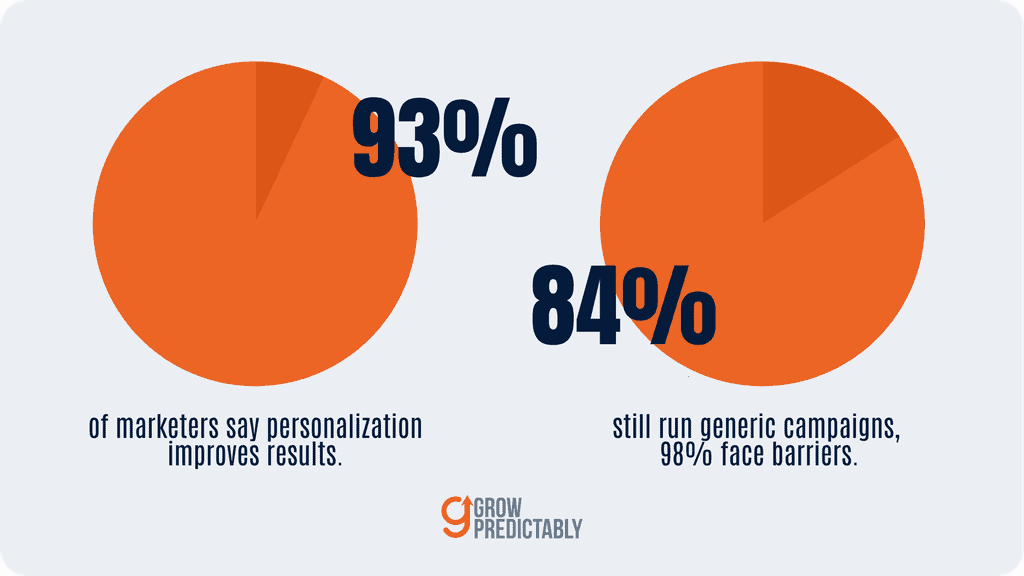
The distinction matters because the market has already scaled the appearance of personalization faster than its usefulness. Salesforce’s 2026 State of Marketing analysis covered nearly 4,500 marketers. It reported that 84% still ran generic campaigns and 98% encountered barriers to personalization, with data problems the most common.
Those figures describe marketer reports, not the lift from any email tactic.
HubSpot’s 2026 marketing statistics provide the other side of the picture. Ninety-three percent of surveyed marketers reported that personalization improves leads or purchases. That is broad self-reported sentiment, not causal proof or a promised conversion increase. Together, the sources expose the operating gap: teams believe relevance matters, yet the data and decision rules behind their messages are weak.
Use this test:
If the context field changes, what meaningful sentence, evidence, or action changes with it?
If the answer is only the salutation, remove the field. Simple and honest beats elaborate and generic.
Which buyer context should change the message?
Only context that changes the recipient’s likely decision should change the message. Four inputs usually matter:
| Input | Useful question | Weak substitute |
|---|---|---|
| Role | What responsibility does this person carry in the decision? | Job-title token in the opening line |
| Account | Which constraint or use case is shared across this account? | Company-name token |
| Trigger | What verified event makes the topic timely? | Old page view treated as intent |
| Decision | What must this person understand or justify next? | Funnel stage assigned from one click |
Buyer behavior supports a decision-first approach. The 6sense 2025 B2B Buyer Experience Report studied nearly 4,000 buyers. It found that 94% ranked their shortlist before speaking with sellers, 79% initiated the first interaction, and the winning vendor was already on the Day One shortlist 95% of the time.
The research does not show that one email created those preferences. It does show why late, generic persuasion is a weak job for email. Useful messages should help buyers evaluate, validate, or share a decision they are already forming.
Record a source and timestamp for every trigger. Product usage may be current. Industry, funding, or hiring data may not be. A webinar response can reveal interest in the topic, not purchase intent. When inputs conflict, choose the least specific version or suppress the message. Missing data is not permission to guess.
How do you build a Decision-Relevance Brief?
The Decision-Relevance Brief is a six-field contract between data, strategy, copy, and automation. Complete it for one segment before anyone writes subject lines.
| Control | Question the team must answer | Required evidence |
|---|---|---|
| Recipient | Who is this for inside the account? | Verified role and account relationship |
| Verified trigger | Why is the message appropriate now? | Named source, event, and timestamp |
| Decision | What question is the recipient resolving? | Observed behavior or stated need |
| Evidence | What proof or guidance reduces uncertainty? | Current, relevant, supportable asset |
| Next action | What is the smallest useful step? | One action proportional to the context |
| Permission | Why may this message be sent? | Consent basis, channel rule, and suppression logic |
Here is a completed example for a permissioned product-led campaign:
Recipient: Workspace administrator at an active trial with at least three invited teammates.
Verified trigger: Three teammates accepted invitations, but no shared workflow was created within 48 hours. Product events are less than one hour old.
Decision: Can the administrator get the team to first shared value without scheduling training?
Evidence: A two-minute setup guide showing the exact shared-workflow step, plus an example for the account’s declared use case.
Next action: Create one shared workflow from a prefilled template.
Permission: The administrator opted into trial guidance. Suppress after the workflow is created, the trial ends, the user unsubscribes, or a customer-success owner opens a live issue.
That brief can produce a direct message: “Your team has joined the workspace. The next useful step is one shared workflow. Here is a prefilled version for the use case you selected.” The value comes from the verified state and tailored help, not from mentioning the administrator’s name.
Before approving the brief, ask five operating questions:
- Specificity: Can an operator identify the recipient, event, decision, evidence, and action without interpretation?
- Traceability: Can the operator locate the source and timestamp behind the trigger?
- Proportionality: Is the ask smaller than or equal to the demonstrated intent?
- Recovery: If one input disappears, does the campaign fall back to a safe generic version or stop?
- Accountability: Does one owner approve exceptions and inspect false positives?
Reject the brief if the decision is merely “buy our product,” if the trigger is an unverified inference, or if the proof is unrelated to the recipient’s question. No amount of polished copy repairs a broken brief.
Pressure-test the brief before writing the campaign
A completed brief can still be wrong. Run three counterfactual checks before copy review:
| Check | Question | Failure response |
|---|---|---|
| Trigger removed | Would this message still be timely without the event? | If yes, the trigger may be decorative. Use the generic control |
| Role changed | Would a different role need different proof or a different action? | Split the segment or remove the role claim |
| Decision disproved | What evidence would show the recipient is solving a different problem? | Suppress the message or route it for review |
Apply those checks to the trial example. If the invited teammates belong to a sandbox workspace, the apparent collaboration gap is not a real adoption problem. If the administrator already opened a support ticket, campaign automation should pause and the support owner should control the response.
If a shared workflow was created but the event arrived late, the success event must suppress the send before the team edits the copy.
Then put the intended message beside the generic control:
Contextual version: Your three teammates have joined, but the workspace has not completed its first shared workflow. Start with the prefilled [declared use case] template. If you are only testing access, you can pause these setup notes here.
Generic control: Ready to continue setting up your workspace? Use this two-minute guide to create a shared workflow, or pause setup notes here.
The contextual version earns its specificity only when all three facts are current: teammate count, missing workflow, and declared use case. The generic control remains useful without claiming more than the data supports. If the contextual message cannot offer better help than that control, do not personalize it.
The brief fits inside a buyer-state lead nurturing workflow, but it does a different job. The workflow decides when a person changes state. This brief decides what useful message belongs inside the approved state.
How should personalization change across B2B email types?
Personalization must respect the relationship that already exists. One rule cannot safely govern every email type.
| Email type | Reliable context | Useful adaptation | Boundary |
|---|---|---|---|
| Permissioned marketing | Declared interests and consented engagement | Topic, depth, and resource | Do not turn one click into buying intent |
| Lead nurture | Approved buyer state and known question | Evidence and next action | State logic belongs to the nurture system |
| Customer lifecycle | Role, plan, product state, and owned issue | Setup, adoption, or renewal help | Coordinate with product and customer success |
| Cold outbound | Public business context and role relevance | Concise hypothesis and low-friction reply | No synthetic familiarity or hidden surveillance |
For permissioned marketing, a content preference can determine subject depth or the supporting asset. A strong B2B SaaS content marketing library gives the campaign something genuinely useful to select.
For lifecycle email, account context often matters more than individual clicks. An administrator may need rollout guidance while an end user needs a task-level example. A renewal owner needs value evidence, not a feature tour.
Cold outbound has the narrowest permission boundary. Public company information may justify a relevant hypothesis, but it does not prove pain, budget, or interest. State the hypothesis plainly. Ask for correction. Avoid details that surprise the recipient because they are personal, stale, or collected without a reasonable expectation of use.
Where should automation stop and human judgment begin?
Automation should stop when confidence is low, the subject is sensitive, or the message could create a promise. A useful routing rule has three levels:
| Confidence | Conditions | Action |
|---|---|---|
| High | Verified event, current timestamp, clear role, approved asset | Automate with suppression rules |
| Medium | One ambiguous input or incomplete account context | Use a broader version or queue review |
| Low | Conflicting data, sensitive issue, commercial commitment, inferred personal detail | Stop and route to a human |
The risk is not AI itself. It is scale without judgment.
We are using the most powerful technology in history to send more one-way spam, faster.
Bobby Jania, Salesforce Agentforce Marketing CMO
Use AI to organize approved facts, select from approved evidence, or draft variants inside the brief. Do not let it invent a trigger, infer a private motivation, manufacture a compliment, or create an unsupported customer claim. The same boundary applies to AI in B2B SaaS marketing automation: automation may execute a decision rule, but an accountable person must define and inspect it.
Require human review for churn risk, security incidents, pricing exceptions, contract questions, complaints, executive outreach, and any message based on a surprising data point. When relevance depends on reading a person’s mind, stop.
How do you protect consent and deliverability?
Consent and deliverability are entry conditions, not optimization metrics. A relevant message can still be inappropriate, and technical authentication cannot repair unwanted contact.
Google’s current email sender guidelines apply bulk-sender requirements at 5,000 or more messages per day to personal Gmail accounts. Those requirements include SPF, DKIM, and DMARC, keeping reported spam rates below 0.3%, and supporting one-click unsubscribe for marketing and subscribed messages.
Those are Gmail requirements. They are not a substitute for legal review, regional privacy rules, or an accurate record of consent.
Build suppression logic into the brief:
- Unsubscribe and complaint events override every campaign rule.
- Product success suppresses reminder messages immediately.
- Active support, sales, or customer-success conversations pause conflicting automation.
- Stale triggers expire instead of remaining eligible forever.
- Frequency caps apply across campaigns, not only within one workflow.
- A person can correct role, preference, and account data.
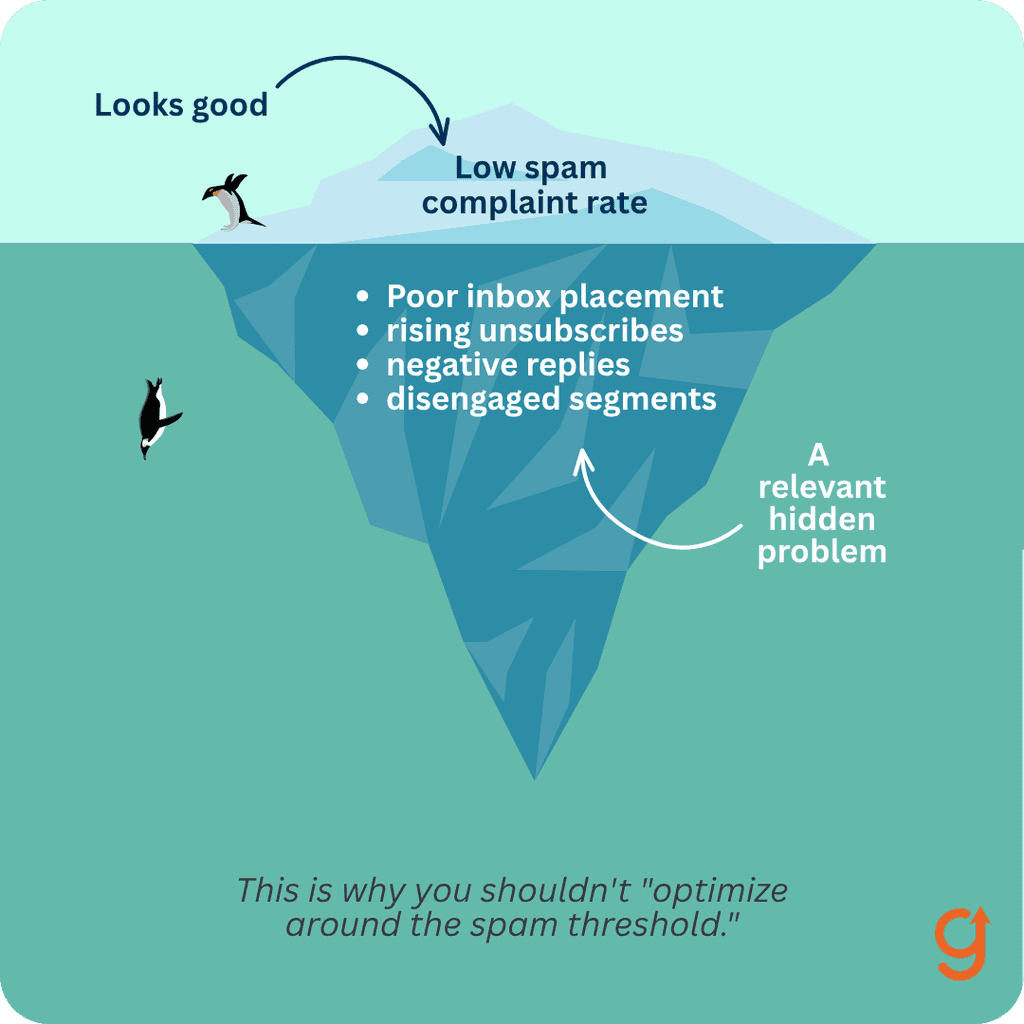
Do not optimize around the spam threshold. A low complaint rate can still hide a relevance problem. Monitor inbox placement, hard bounces, unsubscribes, complaints, and direct negative replies by segment. Stop the variant when a guardrail worsens materially, even if clicks rise.
How do you measure whether personalization worked?
Measure whether the personalized help advanced a legitimate decision, not whether the email attracted attention. Opens are noisy. Clicks can reward curiosity without producing value.
Use a scorecard that connects the message to the intended next step:
| Measure | Definition | Keep or repair rule |
|---|---|---|
| Eligible accounts | Accounts that met every brief condition | Audit exclusions and false positives |
| Qualified next-action rate | Recipients who completed the intended useful step | Primary short-term outcome |
| Account progression | Accounts that reached the next approved state | Confirm the movement is meaningful |
| Time to useful action | Time from send to the intended behavior | Use as a diagnostic, not a vanity metric |
| Unsubscribe and complaint rate | Negative permission signals | Guardrail and stop condition |
| False-context rate | Messages based on wrong role, event, or state | Repair data before copy |
Compare the contextual version with a generic but useful control. Random assignment is best when the audience is large enough and the test is ethical. A staggered rollout or matched comparison may be more practical for small segments. Keep the offer, cadence, sender, and eligibility stable so the personalization logic is the main difference.
Inspect results by account type and role. A lift concentrated in one segment should not become a universal rule. Record confidence limits when sample sizes are small. Keep the variant only when qualified progress improves without worse permission or deliverability signals.
Diagnose a losing test before declaring that personalization failed. Four failure patterns require different repairs:
| Result | Likely problem | Next decision |
|---|---|---|
| Contextual clicks rise, qualified actions do not | The message created curiosity but did not reduce decision friction | Replace the evidence or next action |
| Qualified actions rise, complaints also rise | The help may be useful but the permission or frequency rule is wrong | Stop the variant and repair consent or suppression |
| False-context reports cluster in one segment | A source, timestamp, or role mapping is unreliable | Quarantine that segment and repair the data |
| No meaningful difference from the control | The context did not change the help enough to matter | Keep the simpler control |
Do not rescue a weak result by switching to opens, counting any click as success, or combining segments until the average turns positive. Preserve the original decision rule and record whether the team kept, repaired, or stopped the variant.
That record is what prevents the next campaign from repeating the same mistake with new copy.
What should a lean B2B SaaS team test first?
Start with one permissioned segment, one decision, and one next action. Do not launch a personalization program across the entire database.
In week one, select a recurring decision with reliable data. Complete the six-field brief, verify every source, and define the control, outcome, and guardrails. In week two, send a small randomized or staggered test. Inspect false context before reading the conversion result.
Keep the rule only if the personalized version improves qualified progress and the guardrails hold. Repair the data or message when operators find wrong context. Stop when the trigger cannot be verified or recipients signal that the contact is unwelcome.
If email is not the real constraint, use the Growth Gap Scan to find the system that needs attention first.
Frequently Asked Questions
What is B2B email personalization?
B2B email personalization changes the message’s help, evidence, or next action using verified role, account, trigger, and decision context. Adding a name or company token without changing the substance is cosmetic personalization.
Which data is safe to use in a personalized email?
Use accurate, current data the recipient reasonably expects you to use, such as declared preferences, consented engagement, product state, role, and active account context. Record the source and timestamp. Avoid sensitive, surprising, stale, or inferred personal details, and follow applicable privacy and consent rules.
Should every B2B email use the recipient’s name?
No. A correct name may make a greeting natural, but it does not make the email useful. If identity data is uncertain, omit it. Spend the personalization effort on the recipient’s decision, relevant evidence, and a proportionate next action.
Can AI write personalized B2B emails?
AI can draft variants from an approved Decision-Relevance Brief and approved evidence. It should not invent triggers, infer private motivations, fabricate compliments, or create unsupported customer proof. Human review is required when context is ambiguous, sensitive, or commercially binding.
How do you measure B2B email personalization?
Compare a contextual version with a useful generic control. Measure qualified next actions, account progression, time to useful action, false-context rate, unsubscribes, complaints, and deliverability. Keep the variant only when meaningful progress improves without worse guardrails.
Does personalization hurt email deliverability?
Personalization itself does not guarantee or prevent delivery. Bad data, unwanted contact, misleading content, excessive frequency, poor authentication, and complaints can damage sender reputation. Permission, suppression, SPF, DKIM, DMARC, and monitoring remain necessary.
About the author
Ready to see your real growth gap?
Two minutes in the Growth Gap Scan and you walk away knowing the one thing capping your pipeline. Free, no obligation.